A practical guide for businesses that are tired of missing calls — with enough technical detail to actually ship it.
Every missed call is a customer who called your competitor next. Yet most small and mid-sized businesses still lose calls every single day: after hours, during lunch, when the one person who answers the phone is already on another line. Hiring a full-time receptionist solves it — but at a fully loaded cost of roughly $2,800–$4,500 per month in most Western markets, that's a heavy fix for a phone that rings a few dozen times a day.
There's now a third option that didn't exist a couple of years ago: an AI voice receptionist that answers on the first ring, 24/7, speaks naturally in multiple languages, knows your business inside out, books appointments, and hands off to a human when it should. Running one costs somewhere between $60 and $150 a month for a typical single-line setup.
This post walks through how to build one properly — using ElevenLabs (or Vapi) for the voice brain, Zadarma for the phone number, and a RAG knowledge layer so the agent answers from your facts instead of making things up. It's written for a business audience, but there's enough technical substance here for your engineering team to run with.
What an AI voice receptionist actually is
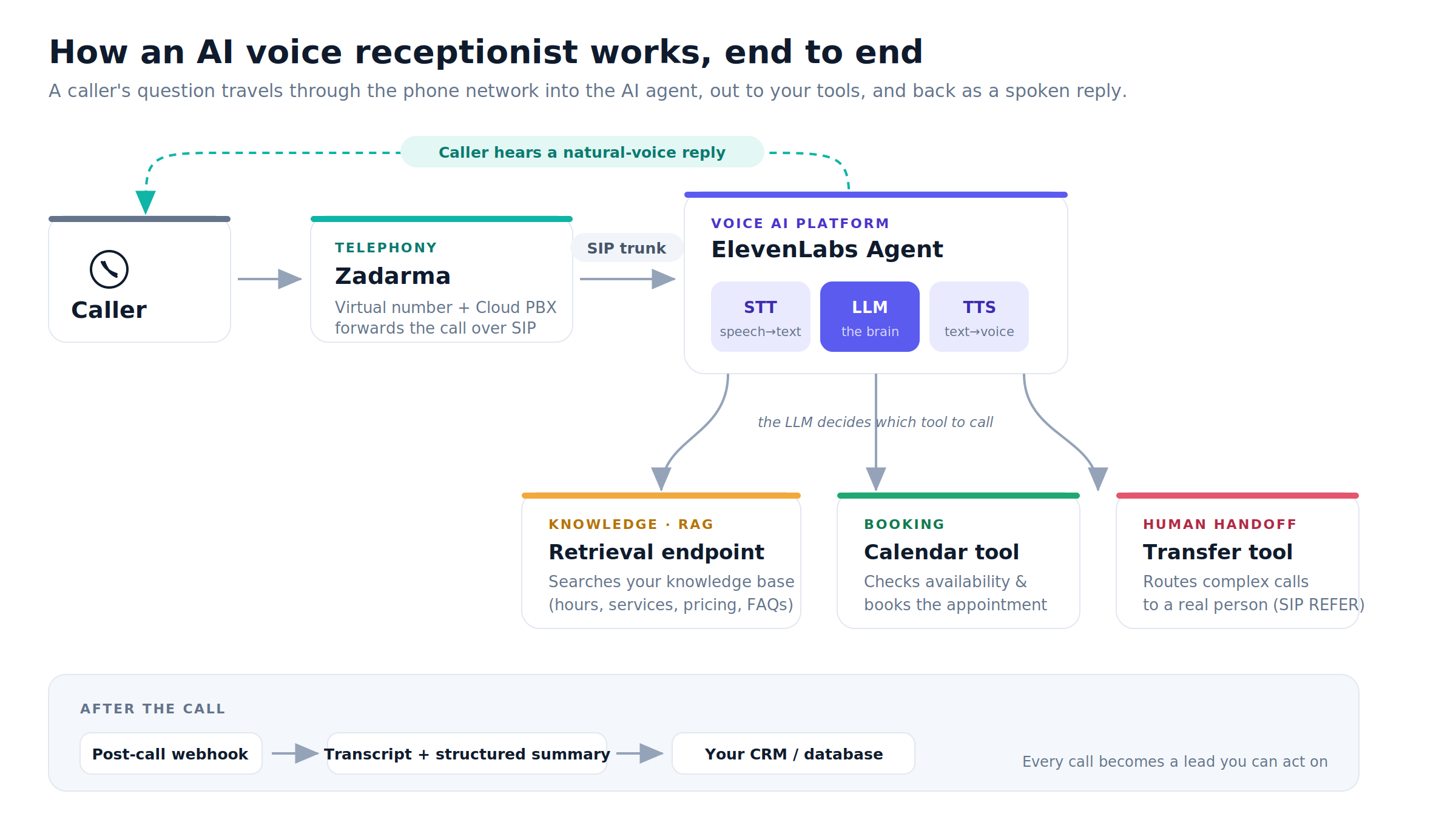
Under the hood, a voice agent is a real-time loop of four things:
- Telephony — the actual phone number and the connection that carries the call.
- Speech-to-text (STT) — turning the caller's words into text.
- The LLM — the "brain" that decides what to say and which tools to use.
- Text-to-speech (TTS) — turning the response back into a natural-sounding voice.
Around that loop you add two things that turn a chatbot-on-the-phone into a genuinely useful receptionist:
- A knowledge base (RAG) so it answers from your real hours, services, pricing, and FAQs.
- Tools so it can do things — book a slot in your calendar, transfer to a human, send a follow-up.
The whole thing has to happen fast. If the round trip from "caller stops talking" to "caller hears a reply" stays under about 800 milliseconds, people stop noticing they're talking to a machine. Cross that line and the conversation starts to feel robotic. Latency is the single most important technical constraint in this build, and it shapes almost every decision below.
Choosing the voice platform: ElevenLabs vs Vapi
Both platforms are legitimate, both are widely used in production, and — importantly — both have official, documented integrations with Zadarma. The difference is philosophy.
ElevenLabs Agents — the all-in-one option
ElevenLabs started as a text-to-speech company and built its Agents product on top of the best voice synthesis in the industry. It's an all-in-one platform: its own ultra-low-latency TTS (their Flash v2.5 model targets around 75ms), built-in turn-taking, a native knowledge base with a one-toggle RAG mode, native tools for call transfer and webhooks, and — crucially for us — a dashboard flow to import a third-party SIP number.
For a business receptionist, the voice quality genuinely matters. This is the voice of your brand answering the phone, and ElevenLabs is the reference other platforms benchmark against. It also natively supports Ukrainian and English (and 30+ other languages), which is relevant if you serve a bilingual market.
One honest limitation: ElevenLabs fixes the language for the duration of a call. A caller can't fluidly switch from Ukrainian to English mid-sentence — you configure the languages and the agent picks at the start. For most receptionists this is a non-issue; for a truly code-switching audience, plan around it (e.g. a language choice up front, or a separate number per language).
Vapi — the orchestration layer
Vapi is a different animal. It's an orchestration platform — think "the plumbing for AI voice agents" — that lets you mix and match your own STT, LLM, and TTS providers, bring your own API keys, and wire up custom function-calling with fine-grained control. It supports 100+ languages and bring-your-own-SIP trunking.
Vapi is more powerful and more flexible, and if you want to own every layer of the pipeline (route to a specific LLM, use your own speech models, pay for models at cost) it's excellent. The trade-off is that it's developer-first: more moving parts, more to assemble, and real-world latency and cost depend entirely on the stack you choose to run.
The verdict
For a business AI receptionist, start with ElevenLabs. You get the best voice, a native knowledge base, and the fastest path to something that sounds human — with far less infrastructure to babysit. Choose Vapi if you have an engineering team that wants to own the full pipeline, needs a specific LLM/STT combination, or wants model costs passed through at cost with your own keys.
The rest of this guide uses ElevenLabs as the primary path and notes the Vapi equivalent where it differs.
The phone layer: why Zadarma
You need an actual phone number and a way to route calls into your agent. Zadarma is a strong fit for a European business for a few reasons:
- It's a European provider (registered in Estonia), which keeps your telephony inside the EU for GDPR purposes.
- It offers virtual numbers in 100+ countries, a free cloud PBX, SIP trunking with no extra trunk fee, and a free API.
- It has pre-built, official integration guides for both ElevenLabs and Vapi — so connecting the two is a documented, well-trodden path, not a science experiment.
- It's cheap: an Estonian (+372) number runs about $5/month with free inbound calls. A German number is even less. Inbound calls to virtual numbers are free.
One practical note: EU numbers require KYC documentation (company registration certificate, a connection letter, a local address). Budget a day or two for verification. Estonian numbers are currently assigned randomly — you don't get to pick the digits.
Giving your receptionist a brain: the RAG layer
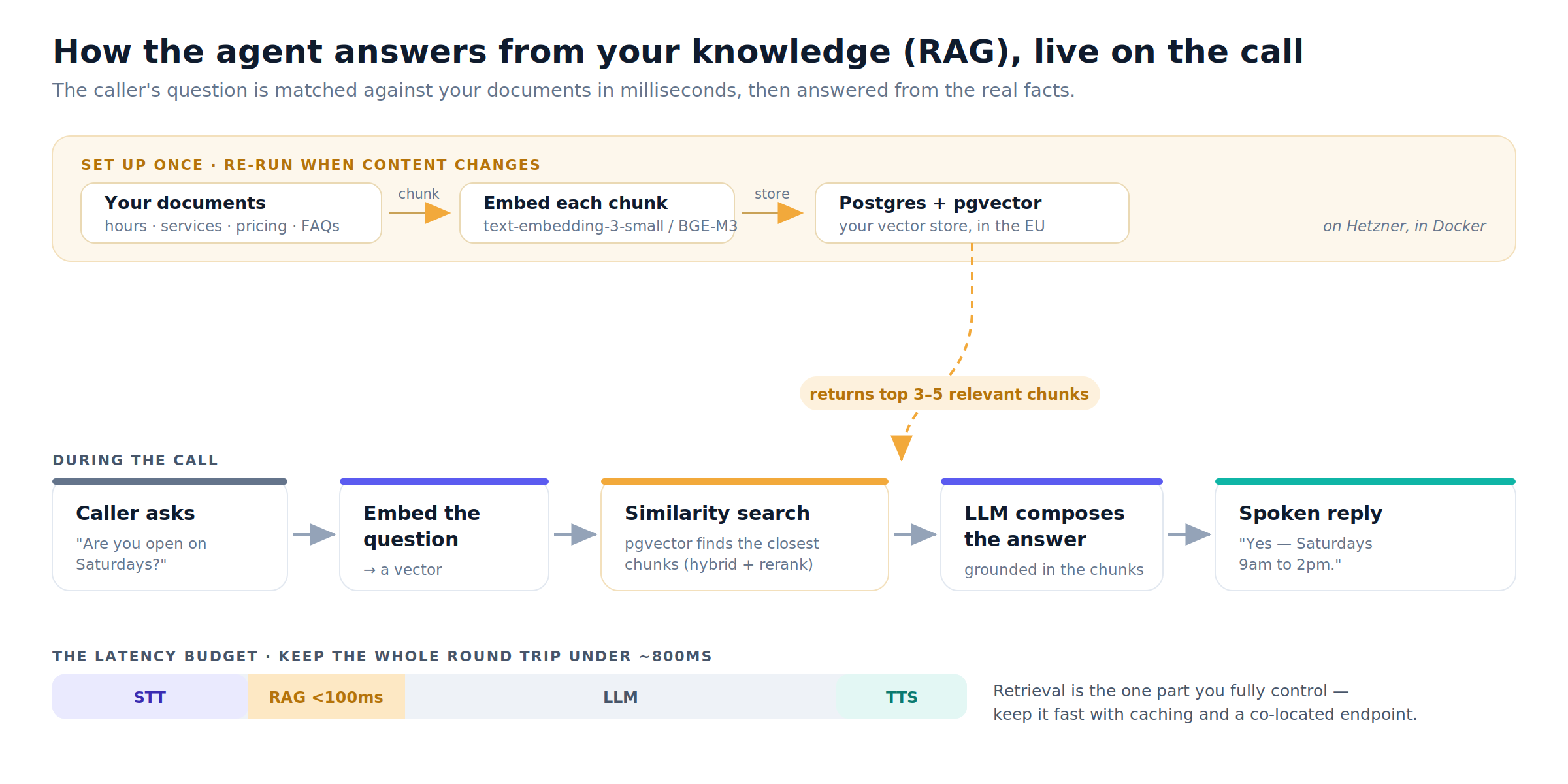
A voice agent with a good prompt but no knowledge base will confidently invent your opening hours. RAG (Retrieval-Augmented Generation) fixes this by grounding every answer in documents you control — your services, pricing, FAQs, booking rules, location, and policies. When a caller asks a question, the agent retrieves the most relevant snippets from your knowledge base and answers from those facts.
You have two ways to do this, and the right answer is usually "start with the first, graduate to the second."
Option A — the platform's built-in knowledge base (start here)
ElevenLabs lets you upload files, URLs, or plain text right in the dashboard and flip on a "Use RAG" toggle. It indexes everything automatically and adds only about 250ms of latency. For a receptionist whose entire knowledge base is a few pages — hours, a service list, a price sheet, a dozen FAQs — this is often all you need. Small documents can even be injected directly into context with near-zero latency, and RAG kicks in automatically once your corpus is large enough to benefit.
(The non-enterprise limit is roughly 20MB / 300k characters — plenty for a receptionist. Vapi has an equivalent built-in Query Tool knowledge base.)
Option B — a self-hosted RAG endpoint (graduate to this)
When you outgrow the built-in option, you build a small retrieval service and register it as a tool the agent calls during the conversation. You reach for this when you need:
- EU data residency guarantees (keep caller data on your own infrastructure),
- dynamic data (live pricing, real-time availability),
- a larger knowledge base than the platform allows, or
- fine control over how retrieval works.
A pragmatic, production-grade stack for this — and one that fits neatly into a modern self-hosted setup on Hetzner with Docker — looks like:
- Vector store: Postgres + pgvector. One database, no extra service, keeps everything in the EU, and stays under ~100ms for the kind of retrieval a receptionist needs. You don't need a dedicated vector DB until you're well past tens of millions of vectors.
- Embeddings: OpenAI
text-embedding-3-small(about $0.02 per 1M tokens — indexing a receptionist knowledge base costs pennies). For zero cross-border data transfer, self-host an open-source multilingual model like BGE-M3via Ollama on the same box — a good choice given Ukrainian + English content. - Retrieval API: a small NestJS (or FastAPI) endpoint that receives the caller's question, embeds it, runs a vector search, and returns the top few chunks. You expose this as a webhook tool in your agent config.
- Secrets: a self-hosted manager like Infisical for your OpenAI key, Zadarma SIP credentials, and the agent's tool auth token.
The latency budget is the whole game here. Because you're inside a live phone call, retrieval needs to come back in well under 100ms to stay within that ~800ms total-response budget. Three techniques keep you honest:
- Fast approximate search, then rerank the top results (40–80ms total, versus 200ms+ for full-precision search).
- Cache frequent questions.
- Keep the endpoint co-located and return concise chunks, not walls of text.
Knowledge base best practices (regardless of option)
- Chunk documents into ~500–800 token pieces with ~100 tokens of overlap.
- Prepend section headings to each chunk. A chunk that says "21 days paid leave" retrieves badly for "what's your leave policy?" until you attach the heading.
- Use hybrid retrieval (semantic vector search plus keyword/full-text search) so exact tokens like product names, prices, and phone numbers don't get lost — pure semantic search under-weights them.
- Curate ruthlessly. A handful of clean, well-organized documents beats a pile of mixed-quality ones.
- Build a small eval set (say, 50 real question/answer pairs) and test against it before you go live.
The full architecture
Here's how the pieces fit together end to end:
Step-by-step: building it
Here's the ordered build a technical team can follow.
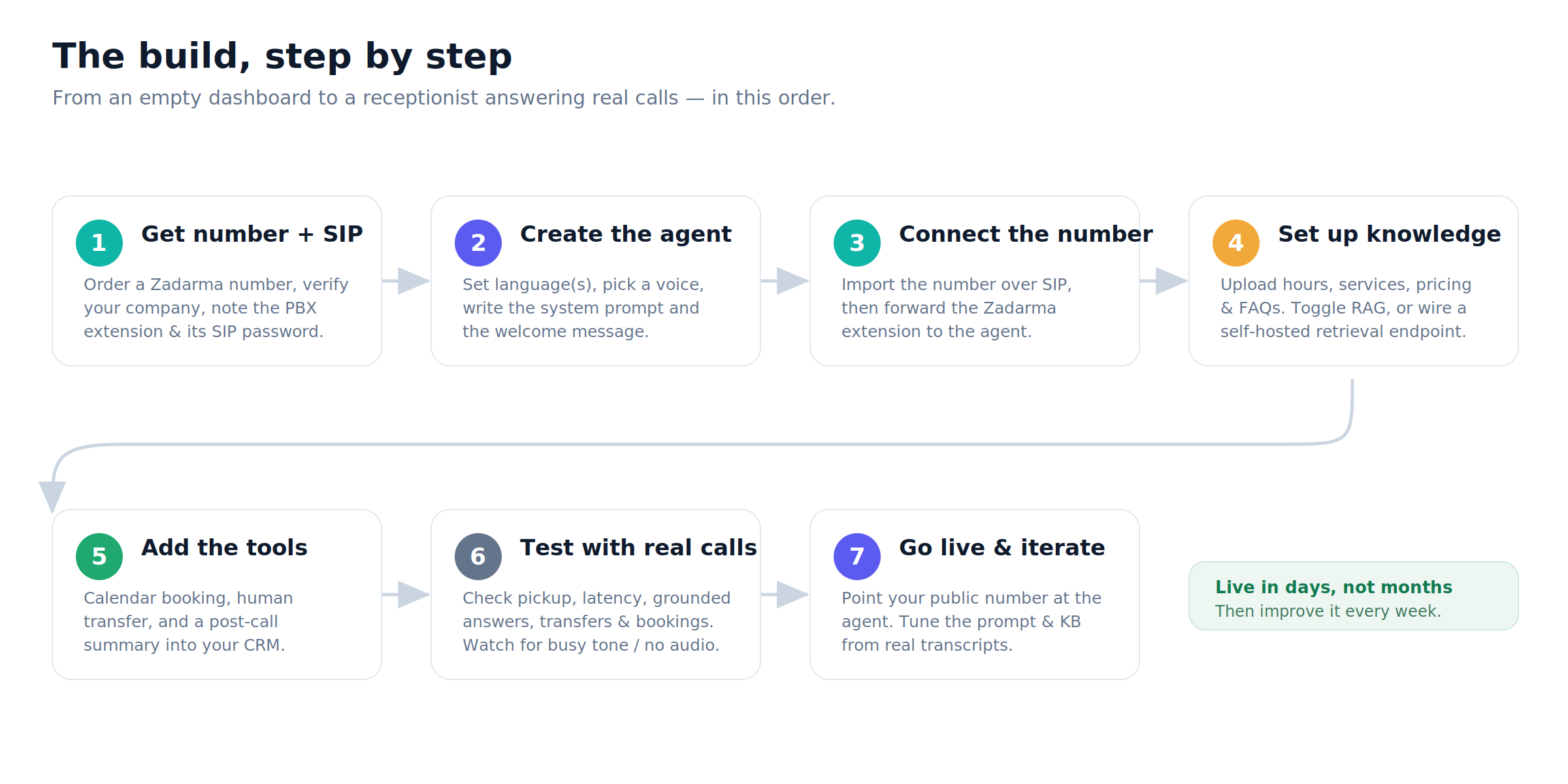
1. Get the number and SIP credentials. Register on Zadarma, top up your balance, order an Estonian (or other EU) number, and upload your company documents for verification. Note your PBX extension and generate its SIP password.
2. Create and configure the agent. In ElevenLabs, create an Agent. Set the language(s) — English plus Ukrainian if you need it — pick a natural voice, and write the system prompt. The prompt is where the personality and rules live: the agent's role, tone, core business facts, when to call each tool, when to transfer to a human, and — importantly — a line disclosing that the caller is speaking with an AI assistant. Set a warm welcome message.
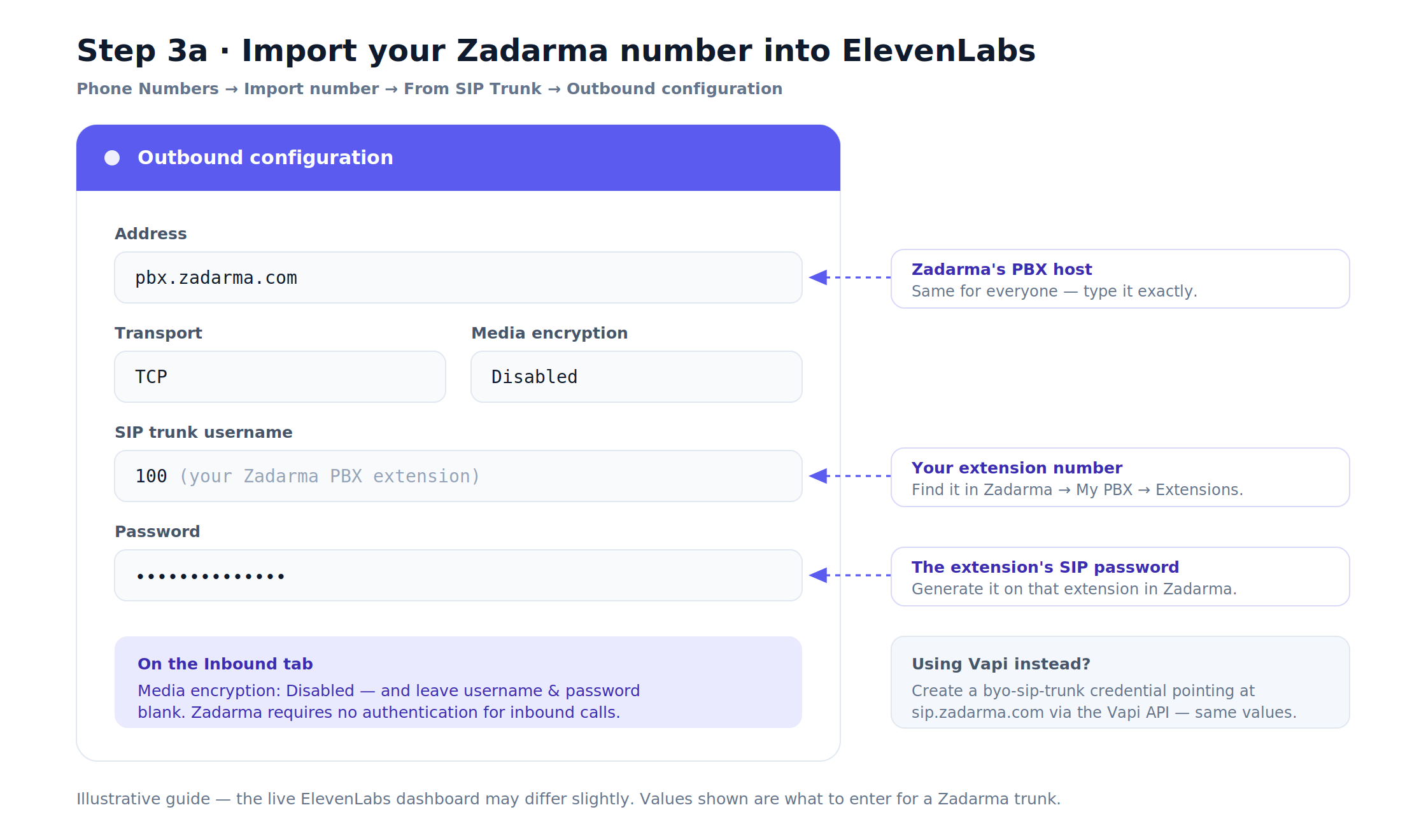
3. Connect the phone number over SIP. In ElevenLabs, go to Phone Numbers → Import number → From SIP Trunk and enter the outbound config (address pbx.zadarma.com, transport TCP, your extension as the username, its SIP password). Then in Zadarma, set the extension to forward inbound calls to the ElevenLabs SIP URI:
+YOUR_NUMBER@sip.rtc.elevenlabs.io:5060;transport=tcp
(Vapi path: create a byo-sip-trunk credential and a byo-phone-number via the Vapi API pointing at sip.zadarma.com, assign your assistant, then forward Zadarma to …@sip.eu.vapi.ai for EU orgs.)
Here's what to enter on each side. First, the ElevenLabs SIP import:
Then, the matching call-forwarding rule in Zadarma:
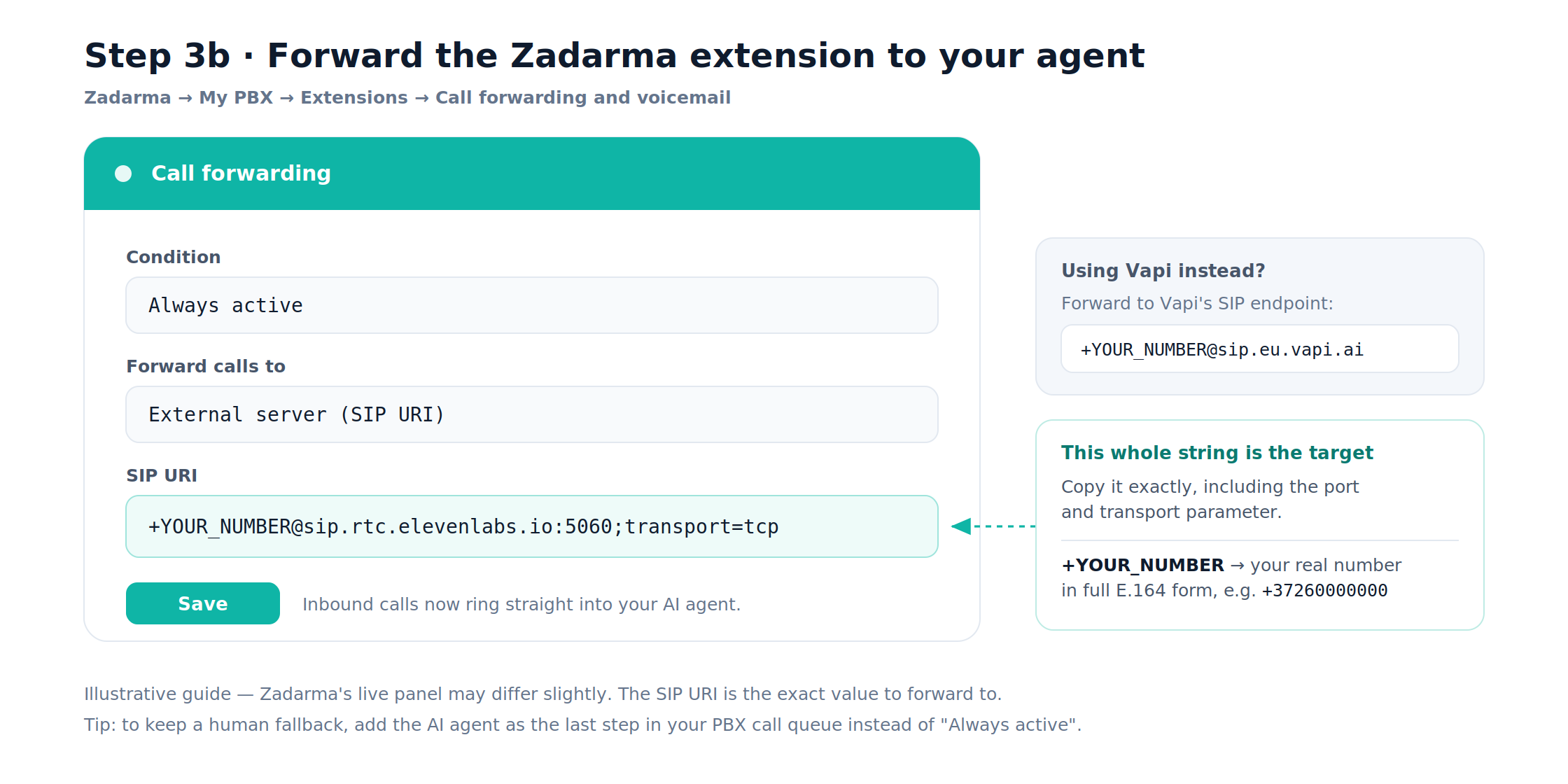
4. Set up the knowledge base. Start with the built-in option: upload your hours, services, pricing, and FAQs, and toggle RAG on. If you're going self-hosted, stand up pgvector in Docker on Hetzner, build the NestJS ingest + retrieve endpoints, register the retrieval endpoint as a webhook tool with a clear name and description ("look up business information to answer caller questions"), and store your secrets in Infisical.
5. Add the tools that make it useful.
- Appointment booking via Google Calendar — typically two tools,
checkAvailabilityandbookAppointment. - Human transfer via SIP REFER, with a rule for anything the agent can't or shouldn't handle.
- A post-call webhook that writes the transcript and a structured summary (name, phone, reason for calling, appointment details) into your CRM or database.
6. Test with real calls. Phone the number yourself. Check pickup speed, conversational latency, whether RAG answers are actually grounded in your documents, whether transfers connect, and whether bookings land in the calendar. Watch for two classic failure modes: a busy tone (you've hit your concurrency limit — raise it or add lines) and one-way audio(almost always a firewall/NAT/RTP issue).
7. Go live and iterate. Point your public number at the agent, then use the call transcripts and analytics to tighten the prompt and fill gaps in the knowledge base. The first two weeks of real transcripts are worth more than any amount of upfront planning.
What it costs to run
For a low-volume, single-line business receptionist in the EU, a realistic monthly breakdown:
| Item | Approx. monthly cost |
|---|---|
| Zadarma Estonian number (inbound free) | ~$5 |
| Voice platform (ElevenLabs Creator or Pro plan) | $22–$99 |
| LLM tokens (passthrough, low volume) | a few dollars |
text-embedding-3-small | pennies |
| Hosting (small Hetzner VPS for RAG + tools) | ~€5–12 |
| Total | ~$60–150/month |
ElevenLabs' paid plans bundle a monthly allotment of agent minutes and concurrent calls, with overage billed around $0.08/minute plus LLM tokens. Vapi charges a $0.05/minute orchestration fee on top of pass-through model and telephony costs, which lands most real deployments in the $0.13–0.33/minute range all-in.
Either way, compare that to a $2,800–$4,500/month human receptionist. For high-volume, repetitive call answering, the AI is a 90%+ cost reduction. A human is still better for complex, sensitive, or emotional conversations — which is exactly why the transfer tool exists.
(All pricing is approximate and current as of mid-2026. Voice-AI pricing changes often — verify on each vendor's page before you commit.)
The honest caveats
An AI receptionist is a genuinely good tool, not magic. Ship it with eyes open.
It's not a human, and shouldn't pretend to be. Give callers an easy, obvious path to reach a person. Route complex, sensitive, or emotional calls to a human every time. The best deployments treat the AI as the confident front line for routine questions and bookings — not as a wall between your customers and your team.
GDPR and the EU AI Act are real obligations, not footnotes. A caller's voice, name, and booking details are personal data — and voice can be biometric data. Two things you must get right:
- Disclose that the caller is talking to an AI, right at the start of the call. This isn't just good manners: under the EU AI Act's transparency rules (Article 50, in force from 2 August 2026), failing to disclose AI interaction can carry serious penalties. Bake the disclosure into your system prompt.
- Handle call recording lawfully. A pre-recorded disclaimer alone is not valid consent under EU guidance. Set a clear purpose and a defined retention period (e.g. 3–6 months for quality assurance), keep data in the EU where you can, and run a DPIA if your processing is higher-risk. Note that using a US embeddings provider like OpenAI is a cross-border data transfer that needs a DPA/SCCs — self-hosting embeddings on Hetzner sidesteps that entirely.
None of this is legal advice — talk to a data-protection specialist for your jurisdiction — but building it in from day one is far cheaper than retrofitting it later.
Latency and concurrency will bite if you ignore them. Keep total response time under ~800ms and RAG retrieval under ~100ms. If callers get busy tones, raise your plan's concurrency limit or add lines.
Where to start
If you're a business weighing this up, the pragmatic path is clear:
- Ship an MVP on ElevenLabs Agents + a Zadarma number + the built-in knowledge base. You can have a natural-sounding receptionist answering real calls in days, not months.
- Add the essentials early: the AI-disclosure line, a human-transfer rule, calendar booking, and a post-call summary into your CRM.
- Graduate to a self-hosted RAG endpoint (NestJS + pgvector on Hetzner) only when you hit a real trigger — data residency, dynamic data, a bigger knowledge base, or the need for finer control.
The technology finally sounds human enough that customers won't hang up, and it's cheap enough that a small business can run it for the price of a couple of nice dinners a month. The hard part isn't the AI anymore — it's the plumbing between the phone, the brain, and your knowledge. That's an afternoon of focused engineering for a team that's done it before.
At Perpetio, we build exactly these kinds of AI-integrated systems — voice agents, RAG pipelines, and the self-hosted infrastructure that runs them. If you're thinking about an AI receptionist for your business, we're happy to talk through what it'd take to build one around your stack.