Claude Opus 4.6 scored 80.84% on SWE-bench Verified in February 2026: the benchmark that measures whether a model can actually fix real GitHub issues. That number matters because it's the point where repo-wide refactoring stops being a party trick and starts being something you can ship with.
This result made many developers rethink what an AI coding agent for Flutter can handle. Yet benchmarks rarely mention what happens when an agent opens a real Flutter project, rewrites a platform channel, and quietly breaks communication between Dart and native iOS code.
That gap, between benchmark performance and what actually happens inside a mobile codebase, is what this article is about. We'll cover Cursor and Claude Code mobile development, Mobile MCP for controlling simulators and devices, and where these tools genuinely help versus where they'll waste your afternoon.
Why 2026 Is the Inflection Point for Agentic Mobile Dev
For most of 2024, AI coding tools were autocomplete with better marketing. The best SWE-bench Verified score at the end of 2024 was around 62%: useful for small functions, unreliable for anything touching real architecture.
Early agentic systems started in the low single digits on the same benchmark, so the progress was real, but it still wasn't crossing the threshold where you'd trust an agent with an entire feature branch.
Claude Opus 4.6 changed the conversation when it hit 80.84% on SWE-bench Verified in February 2026. A score above 80% means the model can resolve four out of five issues in the SWE-bench Verified benchmark.
The developer community noticed the change in AI agent app development 2026. Throughout Q1 2026, r/ClaudeAI and r/webdev saw a wave of engineers sharing terminal-based agentic workflows, not just prompting tips. Anthropic also shipped six meaningful Claude Code features in Q1 alone: Remote Control, Dispatch, Channels, and Computer Use improvements.
For mobile teams specifically, this timing matters. Flutter, iOS, and Android codebases are large, multi-layered, and full of platform-specific edge cases. The question isn't whether agents are ready in general. It's whether they're ready for your codebase. That's what we've been finding out.
Claude Code vs Cursor vs Mobile MCP: Which Tool for Which Job
These three tools are not really competing with each other. They sit at different layers of your workflow, and once you understand that, the "which one should I use" question mostly answers itself.
| Dimension | Claude Code | Cursor | Mobile MCP |
|---|---|---|---|
| Best for | Multi-file refactors, architecture-level changes, repo-wide reasoning | In-editor autocomplete, single-file edits, fast iteration loops | Simulator/emulator automation, UI accessibility snapshots, E2E agent flows |
| Interface | Terminal / CLI (agentic) | IDE (VS Code, JetBrains) | MCP server — connects any agent to device |
| Flutter support | Strong — full repo context | Strong — per-file | Via accessibility tree (any framework) |
| Native modules | Partial — struggles with platform configs | Partial | Read-only inspection; cannot modify |
| SWE-bench score | 80.84% (Opus 4.6, Feb 2026) | Not disclosed | N/A — orchestration layer |
| Ideal user | Agency / senior dev with complex codebase | Solo dev / fast feature work | QA engineer, agent workflow builder |
| Where it breaks | Platform-specific build configs, CocoaPods/Gradle edge cases | Large cross-file refactors, repo-wide decisions | Dynamic UI, non-accessible native views |
Use Claude Code when you need to touch multiple files at once: a state management refactor, adding a feature across layers, or untangling a dependency mess in a large Flutter repo. The full-repo context is what makes it worth the context cost.
Use Cursor when you're in the flow of daily coding and want fast inline autocomplete and visual diffs without switching contexts. It's the better tool for focused, file-level work where you don't need the agent reasoning about the whole codebase.
Use Mobile MCP when you want the agent to actually see what's happening on the simulator. It's the layer that closes the loop between code changes and what shows up on screen: something neither Claude Code nor Cursor can do on their own.
Claude Code as an AI Coding Agent in Flutter: What It Does Well
The best way to understand what Claude Code in Flutter actually does is to watch it handle something that would take a developer half a day manually.
Take a typical Flutter app. 30+ screens, Riverpod for state management, GoRouter for navigation, clean architecture split across feature folders. The kind of codebase where a naming change in a core model ripples into a dozen files, and you spend 45 minutes grep-ing to make sure you caught everything.
A task like migrating all remaining Navigator.push calls to GoRouter named routes is a good stress test. The prompt:
"Audit the entire lib/ directory for any remaining Navigator.push, Navigator.pop, or Navigator.pushReplacement calls. List every file and line number where they appear. Then migrate each one to the equivalent GoRouter named route, updating router.dart if any new routes are needed. Run flutter analyze after and fix any issues it surfaces."
On this kind of task, Claude Code finds every navigation call across all affected files, converts them to GoRouter, adds the route definitions, and updates imports — one prompt, multiple files changed. It also catches places where arguments were passed via the old arguments map and correctly replaces them with GoRouter's typed extra parameter.
This is where Claude Code separates itself from autocomplete tools. It holds the whole repo in context and works across files the way a senior developer would, except it doesn't miss the eighth occurrence or get interrupted before finishing.
What we noticed it doing particularly well:
In our experience, Claude Code often starts by inspecting files like pubspec.yaml and existing configuration before making changes, so it works within your actual dependency versions rather than hallucinating an API from six months ago.
It respects existing folder structure and naming conventions rather than imposing its own. It handles BLoC, Riverpod, GoRouter, Dio, Freezed, and Firebase patterns accurately: the main Flutter ecosystem packages are well within its working knowledge.
The run-test-fix loop is probably its most underrated strength. Claude Code writes tests, runs them, finds failures, fixes the underlying code, and re-runs until everything passes without you touching anything.
On a refactor that touches 15+ files, having the agent verify its own work against your test suite is the difference between shipping confidently and manually checking every screen.
Teams that set up a CLAUDE.md file with explicit conventions get dramatically more consistent output, locking in state management patterns, import organization, and widget decomposition rules means the agent works within your architecture rather than drifting toward its own defaults over multiple sessions. It's a 30-minute setup that pays back on every task after.
## Project conventions
- State management: Riverpod only. Do not introduce setState,
  ChangeNotifier, Bloc, or GetX under any circumstances.
- Navigation: GoRouter named routes only. No Navigator.push.
- Architecture: feature-first folder structure.
  Each feature has data/, domain/, presentation/ subdirectories.
- Testing: widget tests for UI, unit tests for providers and
  use cases. Do not generate integration tests unless asked.
- Imports: use package imports, not relative imports.

## Do not touch
- android/ and ios/ directories unless explicitly asked
- pubspec.lock
- Any file outside lib/ and test/ unless the task requires it
Mobile MCP: How We Use AI to Drive the iOS Simulator and Android Emulator
Claude Code is great at editing your codebase. What it can't do on its own is see the running app. It has no idea if a button renders off-screen, if an empty state is blank when it shouldn't be, or if the onboarding flow silently skips a step. That's what Mobile MCP fixes.
What it does
@mobilenext/mobile-mcp is an MCP server that lets agents interact with native iOS and Android apps through structured accessibility snapshots or coordinate-based taps. Once it's connected to Claude Code or Cursor, the agent can read what's on screen, tap elements, scroll, type, and verify what changed on simulators, emulators, and real devices.
The key mechanic is the accessibility snapshot. Instead of interpreting a screenshot visually, the agent retrieves semantic context from the UI, roles, labels, states, mirroring how assistive technologies access content. It's faster and more reliable than coordinate-based approaches, and it degrades gracefully to screenshots when labels aren't available.
Setup
Setup is relatively straightforward. Add the Mobile MCP server to your MCP configuration, start an iOS simulator or Android emulator, and restart Claude Code. The exact requirements may vary by version, so it's worth checking the latest Mobile MCP documentation before setup.
{
  "mcpServers": {
    "mobile-mcp": {
      "command": "npx",
      "args": ["-y", "@mobilenext/mobile-mcp@latest"]
    }
  }
}
What it looks like in practice
A prompt goes like: "Go through the onboarding flow with test credentials, take a snapshot at each step, and flag anything that looks broken". The agent taps through the whole sequence and reports back.
On one flow we tested, it caught a home screen empty state that wasn't rendering after first login. The feed container was there, the scroll view was there, but no child elements. A Riverpod provider returning an uninitialized state before the first fetch completed — the kind of thing that's easy to miss in a manual walkthrough.
The real value is automating multi-step user journeys without manually controlling the simulator. You describe the intent, the agent handles the navigation, and it flags anything unexpected along the way.
Native module bridges
Claude Code handles pure Dart confidently. The moment a feature crosses into platform channel territory, coordinating Dart method definitions with Swift or Kotlin implementations, quality drops.
A known pattern we've seen: the Dart side looks clean, the native side compiles, and the failure shows up at runtime. Method channel names, argument types, return handling can all mismatch between the two sides and fail silently.
If you're working on anything touching biometrics, camera, Bluetooth, or deep links, treat the native output as a first draft that needs human review.
CocoaPods and Gradle
Both have enough version-specific syntax, deprecation cycles, and project-specific edge cases that even experienced developers approach them carefully.
AI agents are no different. They understand the concepts but regularly miss the detail that makes a specific config actually work.
Standard setups are mostly fine. Anything with custom build flavors, Kotlin DSL complexity, or non-trivial post_install hooks needs line-by-line review.
Dynamic UI that accessibility snapshots miss
Mobile MCP's snapshot approach works well for standard native components. It breaks on anything rendered outside the accessibility tree: custom canvas elements, certain mapping or charting libraries, components built without semantic labels.
There is also a timing issue worth knowing about. Screens with skeleton loaders or async transitions can return a snapshot mid-load, and the agent will act on an incomplete state.
Prompt drift on long sessions
Sessions that start sharp gradually produce output that feels like it came from a different model entirely. Style guides get ignored, error handling gets superficial, earlier instructions stop sticking. The community calls it context rot, and it is consistent enough to plan around.
Time-box your sessions. Anything that matters goes in CLAUDE.md, not in conversation. If a constraint only exists as a message you typed an hour ago, treat it as gone.
A pattern that works well in practice: at the start of any session longer than an hour, create a .claude/session.md file in the repo root and feed it to the agent as the first message:
# Session: Riverpod migration, phase 2
Goal: migrate remaining StateNotifierProviders to AsyncNotifierProvider
Files in scope: lib/features/auth/, lib/features/profile/
Out of scope: anything in lib/core/ -- do not touch
Constraints: Riverpod only, no setState, keep existing test structure
Last session: completed lib/features/feed/ -- all tests passing
The agent reads this at the start, and the constraints are in the active context window, not buried under an hour of conversation history. When you start a new session to continue the work, paste the same file updated with what has changed. It takes two minutes and eliminates most of the "forgot what we decided" failures.
Where AI Agents Still Break (Honest Limitations)
No tool section of an honest review skips this part. Here is where Claude Code and the agentic workflow around it actually fails.
Native module bridges. The moment a feature requires writing or modifying native code on either side of the Flutter/platform boundary, the agent loses reliable footing. It can scaffold the Dart layer confidently, but bridging to Swift, Objective-C, or Kotlin with correct method channel signatures, threading assumptions, and memory handling is where generated code starts needing serious review. It gets the shape right often enough to be dangerous.
Platform build configs. CocoaPods dependency resolution, Gradle version conflicts, entitlement mismatches, provisioning profile edge cases: these are environments the agent cannot see or run. It can suggest fixes, and sometimes the suggestions are correct, but it is working from description, not observation. Build failures in this territory still require a developer who has been burned by them before.
Dynamic UI that accessibility snapshots miss. Mobile MCP reads the accessibility layer. Anything rendered outside it, custom canvas elements, certain animation states, dynamically injected overlays, is invisible to the agent. It will report a clean pass on a screen that has real problems. You need to know which parts of your UI fall outside the snapshot before you trust the output.
Prompt drift on long sessions. Past a certain context length, the agent starts losing coherence on earlier decisions. It will contradict an architecture choice made twenty prompts back, reintroduce a pattern it already refactored away, or silently narrow its interpretation of the original requirements. Long sessions need checkpoints where a developer reads back what was actually built against what was asked for.
These are not edge cases. Every project long enough will hit at least one of them. The workflow holds up because experienced developers are in the loop at exactly these points, not despite that fact.
What This Means for How We Build at Perpetio
We've been integrating these tools into real client projects for the better part of a year now, and the workflow has settled into something fairly consistent.
Claude Code handles the architecture work: state management migrations, cross-feature refactors, test coverage on existing code. Cursor runs alongside it for day-to-day editing and faster iteration on individual files. Mobile MCP comes in during QA, running through user flows on the simulator and flagging broken states, missing elements, and navigation failures through the accessibility layer.
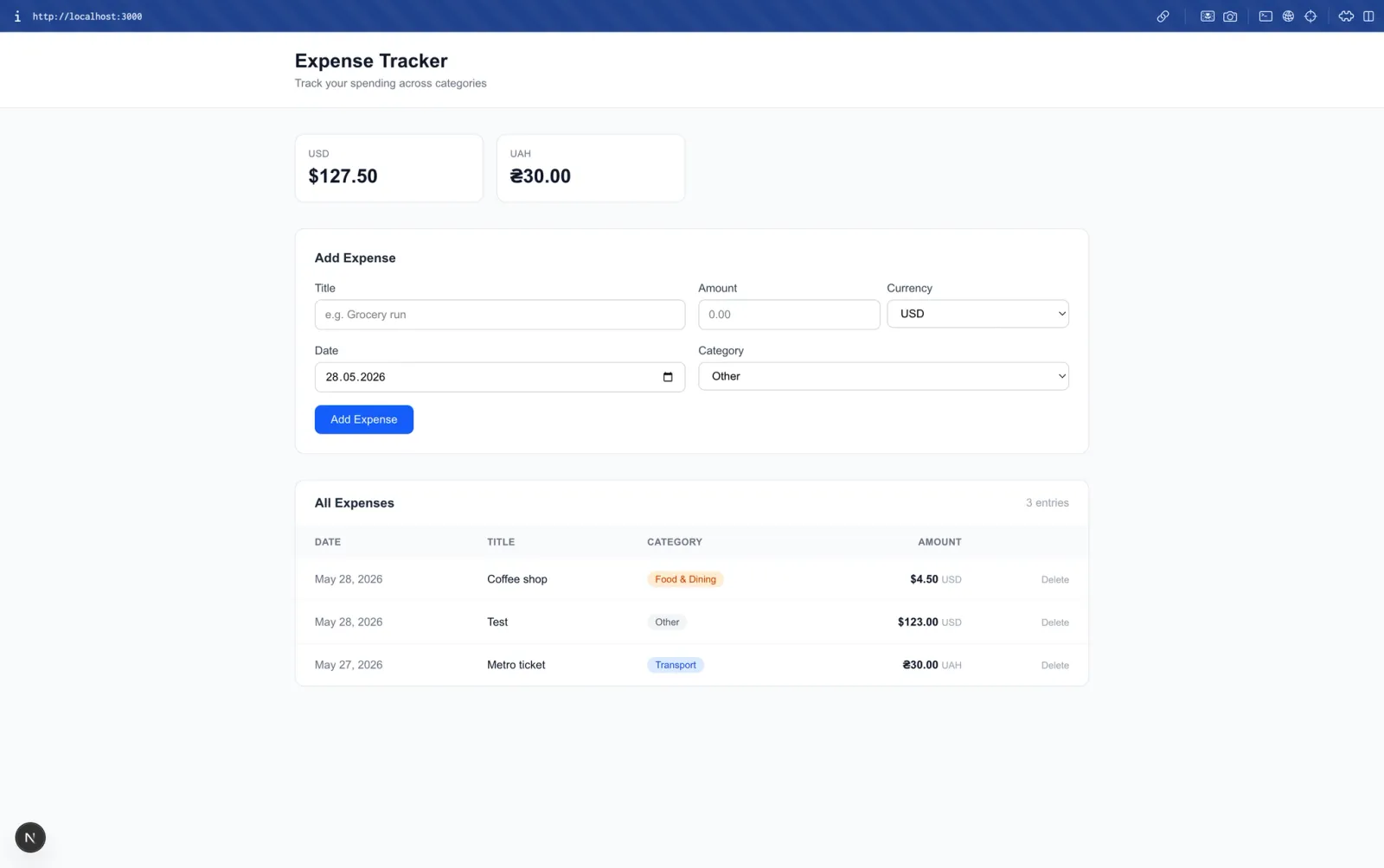
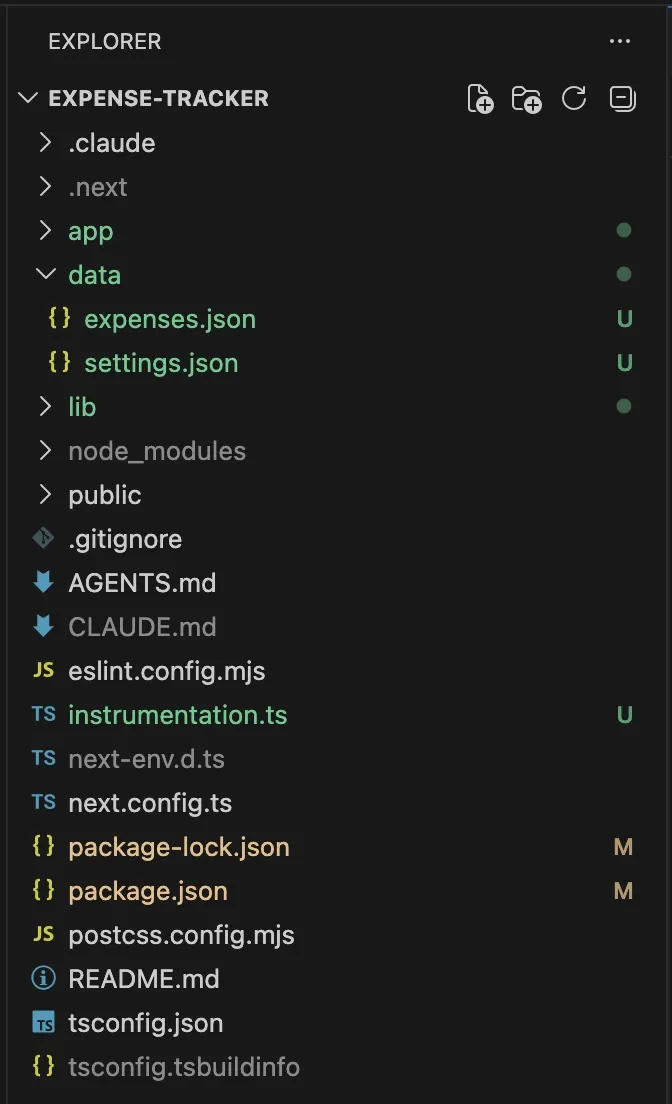
On a recent internal project, an expense tracker with live exchange rates and automated scheduling, we used this combination to go from blank project to fully working app in a single session.
Claude Code caught a broken API endpoint before writing a single line of code, implemented the cron job without any platform constraints, and wired structured logging across every route.
We reviewed the output, made the calls on architecture and edge cases, and shipped it. That ratio, agent handles the breadth, developer handles the judgment, is how it works in practice.
What it hasn't changed is who owns the decisions. Native integrations, performance tradeoffs, anything that might draw scrutiny in app store review: that still takes a senior engineer who knows the platform. The tooling accelerates the execution. It doesn't carry the experience that shapes what gets built.
If you're building a Flutter app and want to understand how this kind of workflow applies to your specific project, we're happy to talk through it. Get in touch with the Perpetio team and tell us what you're working on.
FAQs
What is Claude Code and how does it differ from Cursor for mobile development?
Claude Code is a terminal-based agentic coding tool that reads your entire repository and works across multiple files autonomously. Cursor is an AI-native IDE better suited for daily editing and inline autocomplete. For mobile development, Claude Code handles large refactors and architecture changes while Cursor handles file-level work.
What is Mobile MCP and how does it work with iOS simulators and Android emulators?
Mobile MCP is an MCP server that gives AI agents direct control over iOS simulators and Android emulators via accessibility snapshots and coordinate-based taps. It connects to iOS through simctl and to Android through ADB. This lets agents navigate your app, read what is on screen, and flag broken states without a human touching the device.
Can Claude Code handle Flutter multi-file refactors reliably?
Yes, for pure Dart refactors it is one of the strongest use cases. It handles state management migrations, router changes, and model field renames across large codebases in a single prompt. Reliability drops when the task crosses into native Swift or Kotlin territory.
What are the current limitations of AI coding agents for native iOS and Android development?
Platform channel bridges, CocoaPods, and Gradle configurations are where agents consistently produce plausible-looking output that fails at runtime. Prompt drift on long sessions is also a known issue. Native mobile development still requires experienced human review on anything outside pure Dart or Kotlin application logic.
Is AI agent coding production-ready for mobile apps in 2026?
For Dart-side Flutter work, yes:p multi-file refactors, test generation, and state management migrations are reliable enough to use on real client projects. For native module work, build configs, and anything requiring platform-specific judgment, agents accelerate the work but a senior engineer still needs to own the output.