Open LinkedIn today, and you will probably see vibe coding everywhere. Someone built an app in a weekend. Someone else says they replaced an entire development team with a few prompts. Tools like Lovable, Cursor, Bolt, and Replit make it feel almost effortless to turn an idea into something that actually runs.
And in a lot of cases, that is true. You really can move fast and get something working.
So the real question is this: can vibe coding take you all the way to a market-ready MVP, not just a demo, but something real users can sign up for, pay for, and actually depend on?
The answer is more complicated than the hype makes it seem. Vibe coding can get you surprisingly far in a very short time. But there is a clear gap between something that works and something that is ready for real customers.
What is vibe coding?
Vibe coding is a way of building software where you describe what you want in natural language and let an AI tool generate much of the code for you. Instead of writing and reviewing every line yourself, you guide the AI through prompts, test what it produces, and ask it to make changes until the result works as intended.
The term became popular in 2025, when AI coding tools made it possible for people with little or no programming experience to build functional applications by describing their ideas rather than writing code from scratch.
Tools like Lovable, Bolt, Replit, Cursor, and Claude Code can turn prompts into interfaces, database structures, functions, and even complete application prototypes. The amount of human involvement varies by tool: some are designed for non-developers, while others are built to work alongside experienced developers.
Vibe coding vs. traditional coding
The biggest difference isn't simply AI vs. no AI. It's who is responsible for translating the idea into code and making technical decisions.
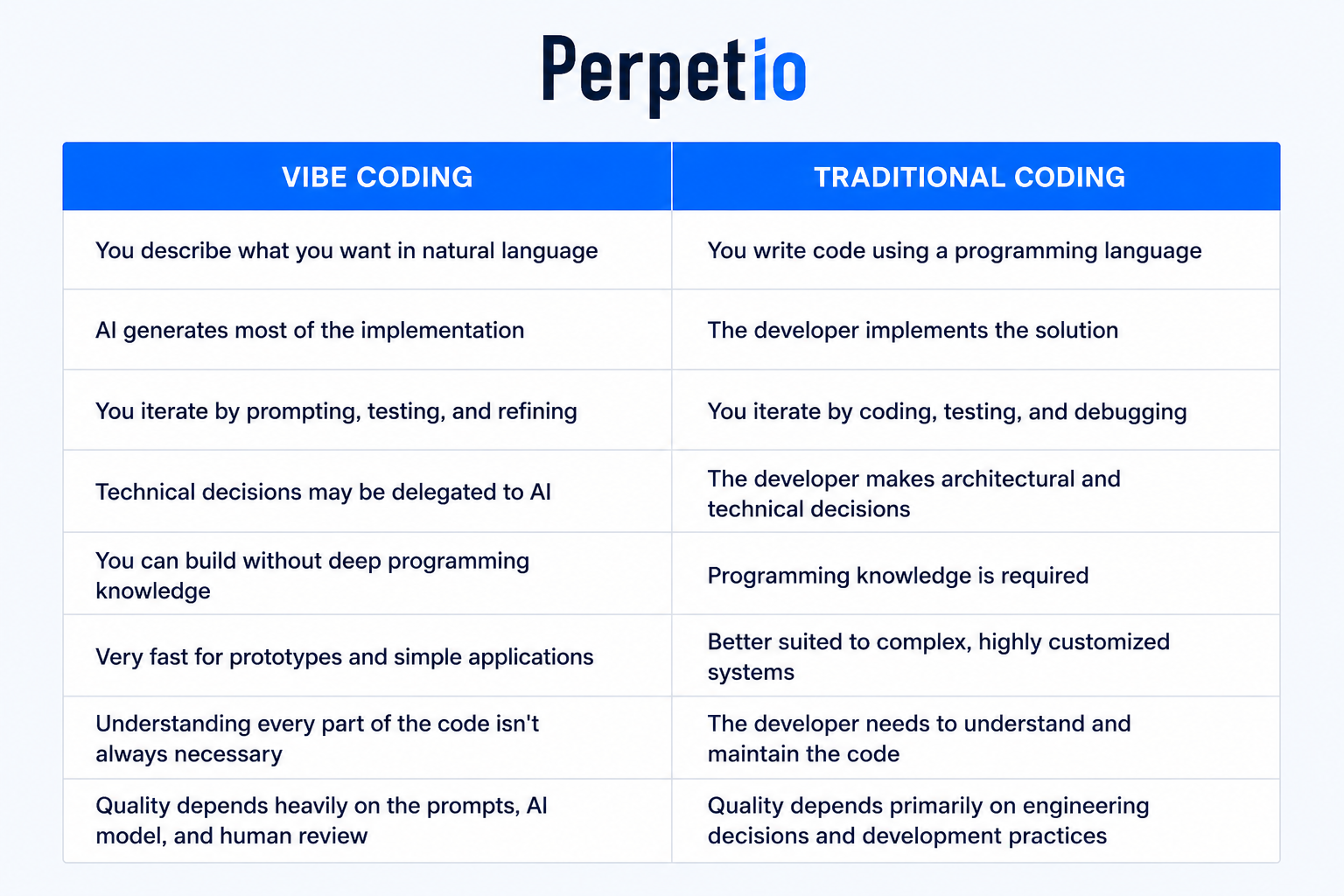
Vibe Coding vs Traditional Development: What Vibe Coding Can't Do
Vibe coding can make the first version of an app feel almost effortless. Describe a feature, let the tool generate the code, fix a few issues with another prompt, and you can have something working in a surprisingly short time.
Our experiments with Bolt.new, Base44, and Claude Code, Cursor, and Mobile MCP showed us where that approach starts to lose its advantage.
The biggest difference is not how quickly code gets written. It is how much of the development process can be safely delegated.
Vibe coding can generate code, but it cannot replace engineering judgment
An AI coding tool can write a feature based on your description. It can choose a library, create components, connect an API, and even fix errors when you give it enough context.
What it cannot reliably do is understand all the business and technical consequences of those decisions.
In traditional development, an experienced developer considers the architecture before implementing a feature. They think about how it will interact with existing code, what happens when requirements change, and whether the solution will still make sense six months from now.
With vibe coding, you can get a working solution before making those decisions.
That is great for experimentation. It can become a problem when the experiment becomes the foundation of a real product.
It cannot reliably understand what “production ready” means
One of the clearest examples came from our Bolt.new experiment.
We asked for a mobile app and received something that looked like one in the browser. But underneath the interface was a Vite and React web application, not a React Native mobile project.
The application technically worked. It just was not the type of application we had asked for.
This is an important distinction. An AI tool can satisfy the visible part of a requirement while missing the technical requirement underneath it.
A developer knows that “mobile app” can mean a very different architecture from “website optimized for a phone screen.” The tool needs that distinction to be explicitly understood and verified.
It cannot guarantee that the happy path is enough
AI-generated applications often perform impressively when everything goes according to plan.
Our experiments showed what happens when it does not.
In the Bolt.new project, a GitHub search feature appeared to work until we tested unexpected inputs and network failures. The generated code contained an empty error handler that silently swallowed certain failures.
In our Base44 experiment, an exchange rate request failed because the selected API did not support UAH. Instead of displaying a useful error, the interface remained stuck on a loading state.
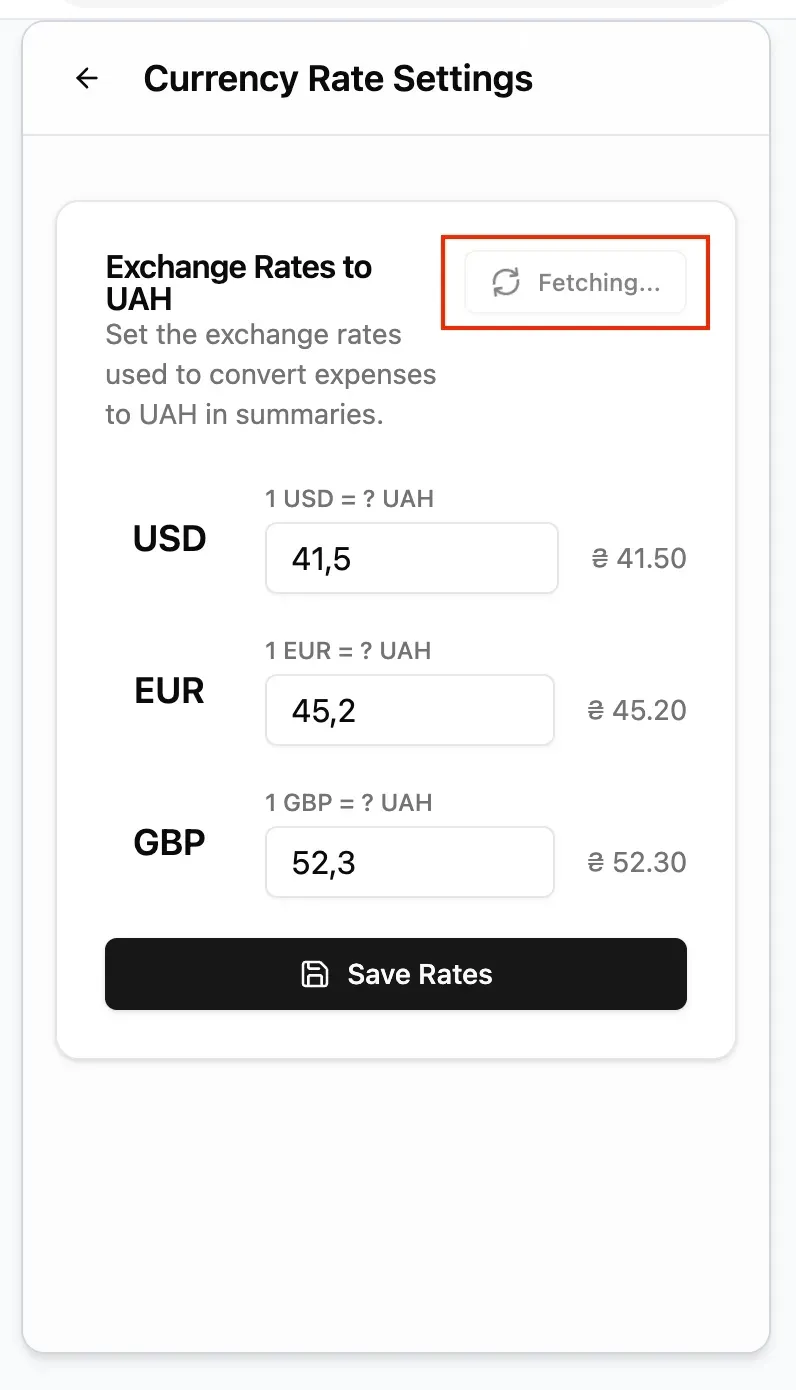
These problems are easy to miss when you evaluate an application by running through the intended flow once.
Traditional development puts much more emphasis on asking what happens when things go wrong. That means testing invalid input, failed requests, missing data, timeouts, duplicate actions, permission problems, and other scenarios that an initial prompt may never mention.
It struggles when several systems have to work together
The more layers an application has, the harder it becomes to rely entirely on generated solutions.
This became particularly clear in our Flutter experiments.
Claude Code was very effective when working within the Dart codebase. It could understand existing patterns and make changes across many files. But once a feature crossed the boundary between Flutter and native iOS or Android code, the risk increased.
A Dart method channel and its Swift or Kotlin implementation can both look perfectly reasonable while still failing because the two sides disagree about a channel name, argument, or return value.
The same applies to platform configuration such as CocoaPods, Gradle, entitlements and provisioning.
A traditional development workflow gives the developer responsibility for understanding how all these layers interact. Vibe coding can assist with each layer, but it cannot guarantee that the whole system works correctly simply because every individual piece looks plausible.
It cannot see everything that a real user sees
AI agents are becoming better at interacting with running applications. Our Mobile MCP testing showed how useful this can be for navigating mobile apps, checking accessibility snapshots and going through user flows.
But even this approach has limits.
An accessibility snapshot does not necessarily show every visual or interactive element. Custom rendered components, certain animations, canvas-based interfaces, and dynamically changing states can fall outside what the agent can inspect.
That means an agent can report that a flow looks fine while something important is still wrong on the screen.
A developer can combine automated inspection with visual testing, device knowledge, and an understanding of how the application is supposed to behave.
It cannot make architectural tradeoffs for your business
There is rarely one technically correct way to build a feature.
Should you use a third-party service or build the functionality yourself? Should data be stored locally or remotely? Should a feature be processed on the device or on the server? Is a quick solution acceptable, or will it create technical debt that becomes expensive later?
These decisions depend on more than the code.
They depend on the product roadmap, budget, security requirements, expected scale, existing infrastructure, and business priorities.
An AI tool can recommend an approach. A developer has to decide whether that approach makes sense for this product.
It cannot take responsibility for the result
This may be the biggest difference of all.
When traditional development is done by an experienced team, someone is accountable for the architecture, security, testing, deployment and long term maintainability of the application.
With vibe coding, it is easy to treat the generated code as if the tool has already made those decisions for you.
It has not.
The tool can write the code. It can explain the code. It can test the code and sometimes fix its own mistakes.
But someone still needs to decide whether the result is good enough to ship.
That is why our experiments have not convinced us that vibe coding makes traditional development obsolete. They have shown something more useful: vibe coding can move a lot of implementation work earlier and make development dramatically faster, but it does not remove the need for engineering judgment.
How Much Does Vibe Coding Really Cost?
Vibe coding is hard to beat on the initial price. You can open a tool, describe your idea, and have a working prototype without hiring a development team or committing to a large project budget.
But the subscription price is only one part of the calculation.
There are really three costs to consider: the cost of the tool, the cost of your own time, and the cost of turning the generated code into a product you can confidently maintain.
The upfront cost is genuinely low
For someone testing an idea, vibe coding can be remarkably affordable.
Many AI coding tools offer free plans or relatively inexpensive subscriptions, so you can experiment with an idea before spending thousands on development. You can also make changes yourself instead of paying a developer for every small iteration.
That makes vibe coding particularly attractive for founders who want to validate an idea before committing to a full development project.
And the productivity gains are not just marketing. A 2025 Microsoft Research study covering 4,867 developers across Microsoft, Accenture, and a Fortune 100 company found that developers using an AI coding assistant completed 26.08% more tasks on average than those without it.
So yes, AI can reduce the amount of developer time needed for many tasks. The question is what happens to the cost when the application becomes more complicated.
Your time is part of the price
A low subscription does not mean the project costs nothing.
If you are building the application yourself, you are also spending time writing prompts, reviewing generated code, testing features, figuring out why something broke, and learning the tools themselves.
This can still be a great tradeoff when you are validating an idea. But once the project becomes complex, debugging can start eating into the time you saved by generating the code in the first place.
Stack Overflow's 2025 Developer Survey gives some useful context here. 66% of developers said they encountered AI solutions that were almost right but not quite, while 45% said debugging AI-generated code is more time-consuming.
That is exactly the kind of cost that is difficult to see on an AI tool's pricing page.
The cleanup cost can come later
This is where the economics can change.
In our Bolt.new experiment, the initial prototype was quick and inexpensive. But when we looked at what would be required to turn the generated project into a proper React Native application, the scope changed completely.
The project we received was actually a Vite and React web application, despite the original request for a mobile app. Turning it into a clean React Native application meant rewriting the screens, replacing web components, adapting the styling system, changing the architecture, and testing the result on iOS and Android.
We estimated around 32 to 50 hours of additional development work.
Suddenly, the cost was no longer the price of a Bolt subscription. It was the developer time required to understand, correct, and rebuild what the tool had produced.
Cheap to build does not always mean cheap to own
Our Base44 vs. Claude Code experiment showed another side of the equation.
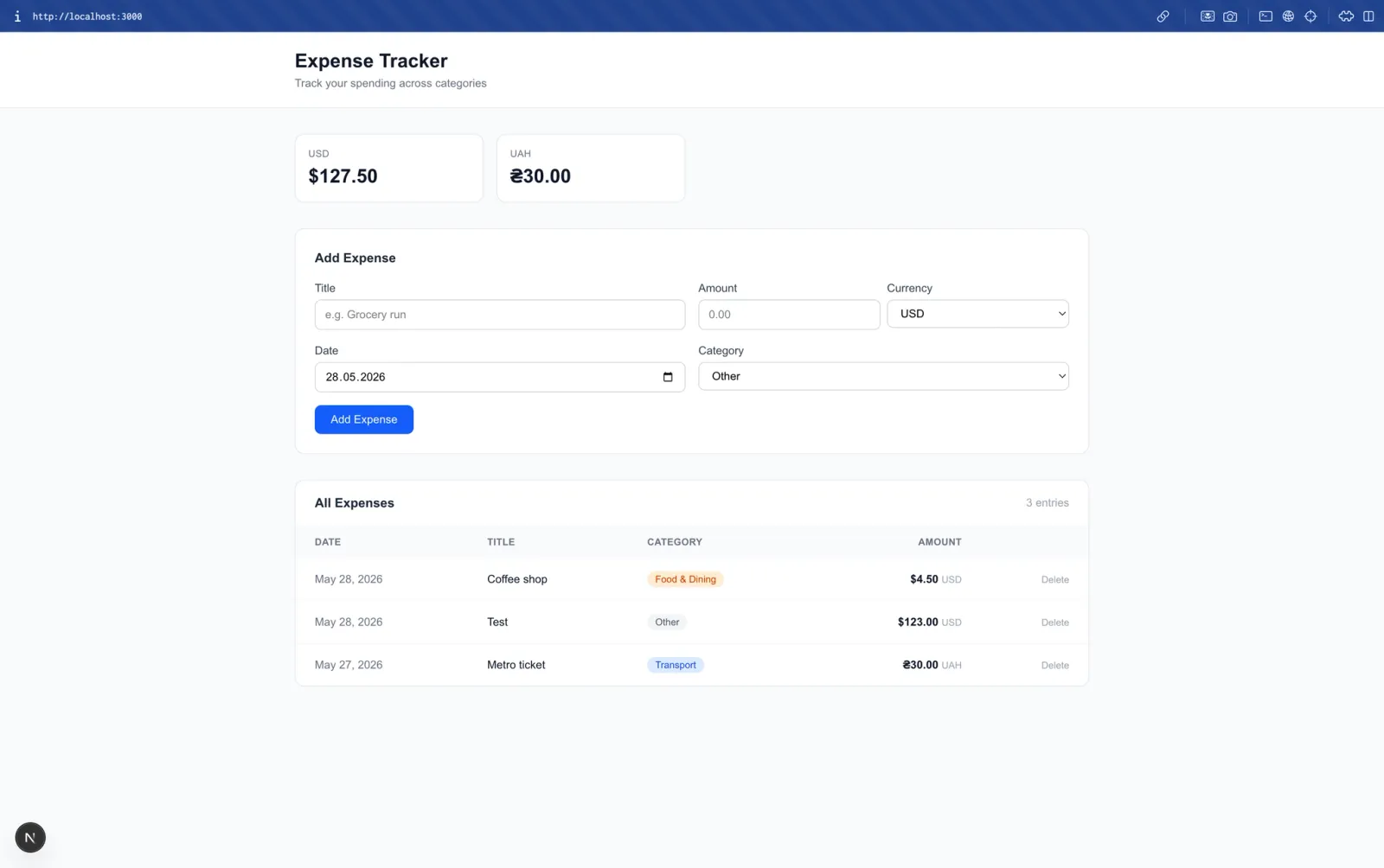
Base44 let us build an expense tracker quickly, but we hit a wall when we needed scheduled automation, deeper debugging, and more control over the generated code.
The same functionality was implemented directly in the Claude Code version without the platform limitations. We could inspect the code, add structured logging, change the implementation, and run the scheduled task ourselves.
This is an important difference when calculating the cost of an application.
You are not only paying to create the software. You are paying to change, debug, maintain, and operate it.
A tool that is extremely cheap for the first version may become less attractive if every new requirement means working around its limitations or eventually rebuilding parts of the application.
Professional development costs more because it includes more than code
Traditional development has a much higher upfront cost, and there is no point pretending otherwise.
When you hire a professional development team, you are paying for much more than someone typing code into an editor. You are paying for architecture, technical decisions, testing, security, platform expertise, code review, debugging, deployment, and the ability to maintain the product after launch.
That is particularly important when the application handles payments, personal information, complex integrations, or anything your customers rely on.
The higher initial cost can therefore buy something that vibe coding does not automatically provide: a team responsible for the quality of the finished product rather than simply the speed of its generation.
The cheapest option depends on what you are building
For a prototype, internal tool, experiment, or early MVP, vibe coding can be the obvious choice.
You can test an idea without making a major financial commitment, learn what users actually want, and decide whether the product deserves further investment.
For a product that already has traction, however, the calculation changes.
If fixing generated code takes longer than writing the feature properly, if the architecture prevents you from adding important functionality, or if every new developer has to spend days understanding what the AI generated, the original saving starts to disappear.
That is why we would not compare the two approaches simply by asking:
“How much does it cost to build version one?”
A better question is:
“How much will it cost to get from the first version to a reliable product, and how much will it cost to keep that product running?”
Vibe coding can make the first number dramatically smaller. Professional development can make the second part much more predictable.
The right choice depends on how far you expect your first version to go.
How To Use A Hybrid Approach To AI-Assisted Development
A hybrid development approach combines AI coding tools with professional developers. AI handles repetitive implementation work, while developers remain responsible for architecture, security, integrations, testing, scalability, and production readiness.
Use vibe coding to validate the idea
AI coding tools are most useful during the early stages of development. Founders can use tools like Cursor, Claude Code, Bolt, or Lovable to quickly build prototypes and test core user flows, interfaces, and product concepts.
At this stage, the goal is to validate the idea rather than build production-ready software.
Bring developers in as complexity grows
Once the product involves payments, authentication, sensitive data, third-party APIs, native mobile functionality, or complex business logic, professional development becomes more important.
Developers can review AI-generated code, identify architectural issues, improve the project structure, and establish a reliable technical foundation. You do not necessarily need to discard the existing code; the goal is to determine what can be reused, refactored, or rebuilt.
Let AI accelerate development, not make the decisions
Developers can use AI to generate boilerplate, create components, write tests, refactor code, investigate errors, and handle repetitive implementation.
However, developers should make the final decisions about:
- Architecture: How the application is structured.
- Security: Authentication, authorization, data protection, and secrets.
- Integrations: APIs, payments, and third-party services.
- Testing: Edge cases, failure scenarios, and regression testing.
- Performance: Response times, resource usage, and scalability.
- Deployment: CI/CD, monitoring, and production environments.
- Maintainability: Code quality, dependencies, and technical debt.
Adjust the balance as the product grows
The role of AI and developers can change throughout the project:
Idea → AI prototype → Technical review → Production MVP → AI-assisted development → Human-led maintenance
Use AI heavily when the risk is low and speed matters most. Increase developer involvement as the application gains users, integrations, data, and technical complexity.
Know when to stop vibe coding
It may be time to bring in developers when:
- New features repeatedly break existing functionality.
- The codebase contains duplicated or inconsistent code.
- Complex integrations are becoming difficult to manage.
- Performance problems appear as usage grows.
- Security requirements become more important.
- Developers spend more time fixing generated code than building new features.
- The architecture no longer matches the product's requirements.
At that point, continuing to patch the application can create more technical debt than it saves.
Perpetio's approach
At Perpetio, we use AI-assisted development alongside professional engineering practices. Our teams combine AI coding tools with expertise in mobile, web, backend, and cross-platform development to help turn prototypes into production-ready applications.
The result is faster development without giving up control over architecture, quality, security, or long-term maintainability.
If you have a vibe-coded prototype but aren’t sure how to turn it into a production-ready app, contact Perpetio for a free consultation. We’ll assess what you’ve built, identify what needs to be improved or rebuilt, and help you choose the right path to launch.