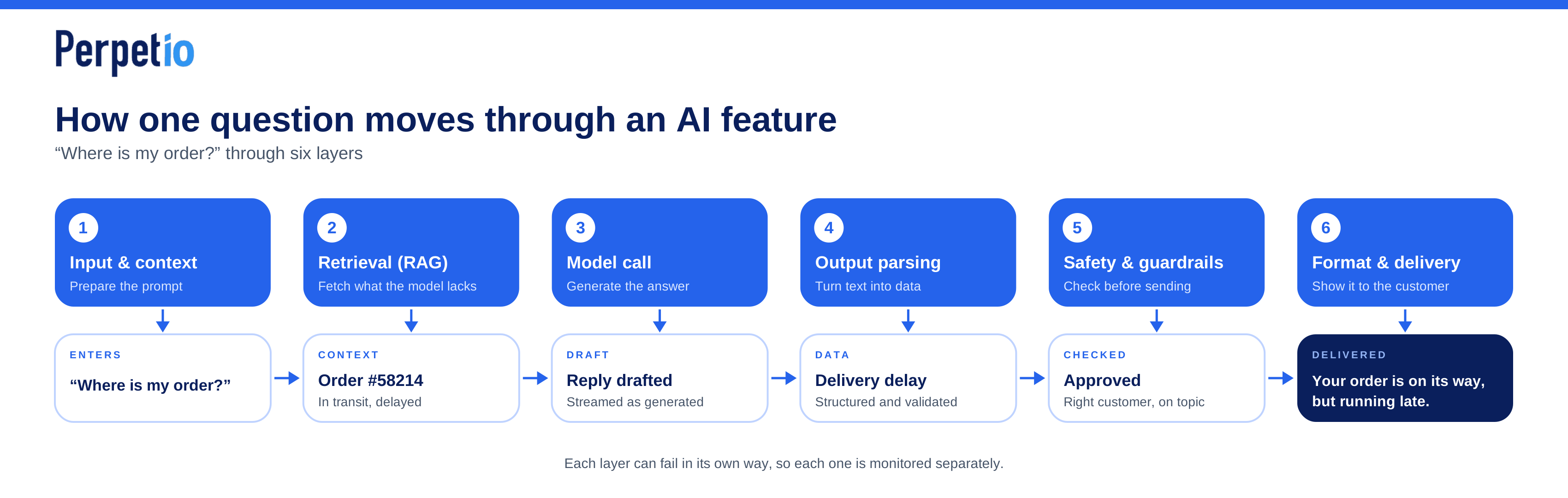
A customer asks an AI support assistant, “Where is my order?” To answer, the app needs more than a language model. It may need to identify the customer, retrieve the latest order status, prepare the relevant context, generate a response, check its structure, and display the result. If any step fails, the customer could receive outdated information, an incorrect answer, or no answer at all.
Understanding how LLM app architecture works means looking at the entire process, not just the model call. The AI product architecture LLM developers build around a model determines what information it receives, how its output is checked, and how the app handles errors.
In this article, we’ll follow the order-status question through six core layers of a production AI feature, examine what each layer does, and look at the problems developers need to account for.
Layer 1: Input processing and context construction
Before an LLM generates a response, the application needs to prepare the information it receives. This stage includes validating user input, selecting relevant conversation history, adding user-specific context, and assembling the instructions that guide the model.
A well-designed LLM prompt engineering pipeline helps the model understand what the user needs and which information it should rely on.
Input validation and context management
The application first validates the incoming request, checking formats, required fields, and input length limits. It should also treat user messages and retrieved documents as untrusted data. Prompt injection attempts, such as instructions to ignore previous rules, cannot be reliably prevented through text filtering alone. Sensitive operations and access permissions must be enforced by application code.
Next, the system selects the conversation history needed for the current response. Sending every previous message can increase token costs and eventually exceed the model's context window. LLM context window management techniques include keeping recent messages, summarizing older exchanges, and retrieving specific details when needed.
The application can also inject relevant user context, such as language preferences, account details, or subscription status. It should retrieve only the information necessary for the task to avoid unnecessary costs and exposure of sensitive data.
For a practical look at conversation history, token limits, and context management, see our guide to integrating ChatGPT or Claude into an existing mobile app.
System prompt construction
Finally, the application combines this information with a system prompt defining the model's role, behavioral rules, and output format. For example, a customer support assistant might be instructed to rely on approved documentation and ask clarifying questions when information is missing.
The result is a model-ready input containing the right instructions and relevant context. Even a capable model can produce unreliable answers when that input is incomplete, contradictory, or overloaded with irrelevant information.
Layer 2: Retrieval (RAG). Giving the model what it doesn't know
Large language models generate answers based on patterns learned during training and the context provided at inference time. They don't automatically know your company's latest pricing, internal documentation, customer records, or product updates. Without access to this information, a model may fill gaps with plausible-sounding but incorrect answers. This is one reason AI applications can hallucinate when asked about proprietary data.
Retrieval-augmented generation (RAG) addresses this problem by finding relevant information from an external knowledge source and adding it to the model's input before generation. Instead of relying on training data alone, the model can use retrieved documents to answer the user's question.
How RAG architecture works
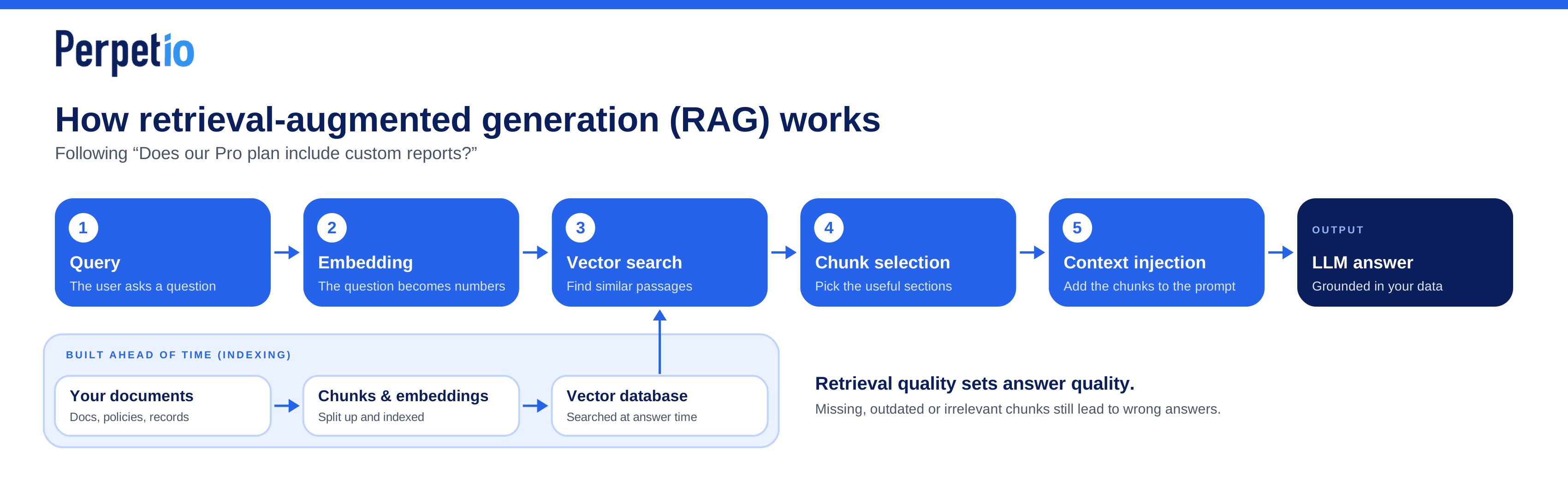
A typical RAG pipeline has five main steps:
- Query: The user asks a question, such as “Does our Pro plan include custom reports?”
- Embedding: The system converts the query into an embedding, a numerical representation that captures aspects of its meaning. Documents are converted into embeddings during a separate indexing process.
- Vector search: The system compares the query embedding with document embeddings in a vector database to find semantically similar content. This can surface relevant passages even when they use different wording from the original question.
- Chunk selection: The application selects useful sections from the retrieved documents. Documents are usually split into smaller chunks during indexing, making it easier to retrieve specific information rather than entire files.
- Context injection: The selected chunks are added to the model's prompt, along with instructions to use that information when answering.
This is the basic flow behind embedding search for LLMs. In practice, retrieval can also use keyword search, metadata filters, reranking models, or a combination of methods to improve relevance.
The architecture also changes when inference happens directly on a device rather than through a cloud API. For example, building a local LLM app with Flutter involves different trade-offs around model size, device resources, and performance.
Why retrieval quality matters
RAG doesn't guarantee factual answers. If the right document is missing, the search returns irrelevant chunks, or the retrieved information is outdated, the model may still produce a wrong answer. Access controls also matter: retrieval must respect which documents a user is allowed to see.
For reliable results, developers need to design both sides of the pipeline: how knowledge is prepared and indexed, and how relevant passages are retrieved at answer time. Understanding RAG architecture means looking beyond the vector database to the full process that connects a user's question with trustworthy, up-to-date context.
Layer 3: The model call
Once the application has assembled the prompt and relevant context, it sends a request to the LLM provider. This part of AI product architecture gets much of the attention, but choosing a model is only one decision among several that affect production performance.
Model parameters that matter
A few settings directly influence the response:
- Temperature controls output variability. Lower values generally produce more predictable responses, while higher values encourage greater variety. For factual support tasks, lower settings are often a sensible starting point.
- Max tokens limits the length of the generated response. A limit that's too low can cut off answers, while an unnecessarily high limit can increase cost and latency.
- Stop sequences tell the model when to stop generating if a specified sequence appears. They're useful for some structured or multi-step outputs, though many applications can rely on the provider's standard stopping behavior.
Where inference takes place also affects latency, privacy, and access to device resources, as explored in our article on why some companies are moving away from the cloud.
These parameters should be tested against real use cases rather than copied from another application.
Streaming and provider reliability
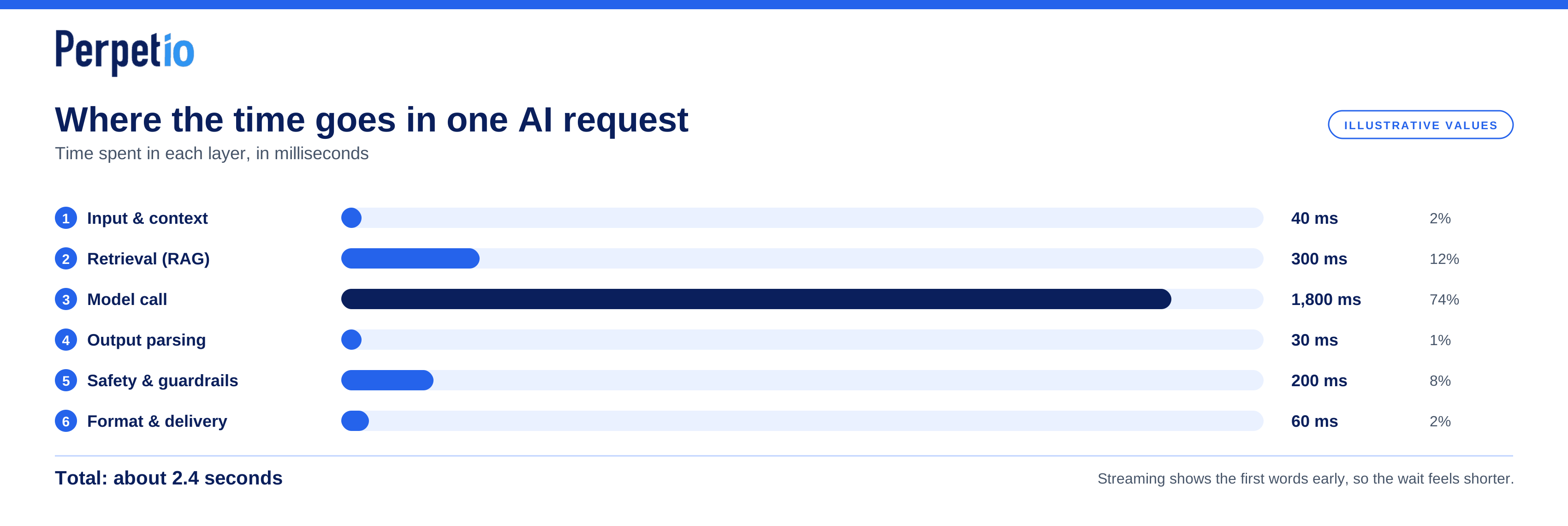
With streaming enabled, the application can display output as the model generates it instead of waiting for the complete response. This reduces perceived latency, especially for longer answers, even when the total generation time remains similar.
Provider choice also affects cost, response speed, model capabilities, rate limits, and availability. Production systems should define what happens when a provider times out, returns an error, or reaches a rate limit. Depending on the task, this may mean retrying with backoff, switching to a compatible fallback model, or returning a clear error. Fallbacks need testing too: a cheaper or smaller model may not follow the same instructions or produce the same output format.
The goal is to configure the model call for the application's actual needs, while designing for failures instead of assuming every request will succeed.
Layer 4: Output parsing and structured data extraction
LLMs generate text, but most product features need structured data they can process. A support assistant might need to identify an issue type, while a document processing tool must extract names, dates, and amounts. In both cases, the application needs predictable output rather than a paragraph.
LLM output parsing and structured data extraction turn model responses into a format the rest of the system can use. Without this layer, even a correct answer can break the workflow.
Make model output predictable
Many LLM APIs support JSON mode or structured output APIs that constrain responses to a specific format or schema. For example, a support tool might expect:
{
  "customer_name": "Anna Smith",
  "order_id": "58214",
  "issue_type": "delivery_delay"
}
The schema can define required fields, data types, and allowed values. However, valid JSON doesn’t guarantee correct data. The model could return an unsupported issue type or an order number that doesn’t exist. Your application must validate the response before using it.
Add parsing fallbacks
When structured output isn’t available, a standard JSON parser can handle responses in the expected format. Regex may work for simple, predictable patterns, such as extracting a reference number, but it’s fragile when applied to arbitrary text or nested structures.
A reliable fallback should:
- Parse the response and validate it against the expected schema.
- Retry with clearer instructions if parsing or validation fails.
- Limit retries to avoid unnecessary latency and API costs.
- Log repeated failures or route critical cases to human review.
Prepare for production failures
Parsing is a common failure point in production AI features. Monitor validation errors, retry rates, and fields that frequently come back missing or malformed. Define what happens when the application can’t obtain valid data: a recommendation feature might show a fallback message, while a workflow that updates customer records should stop rather than guess.
The goal is to make the application resilient to imperfect responses, not to assume the model will always follow instructions.
Layer 5: Safety, guardrails and content filtering
Even a well-designed AI feature can produce harmful, irrelevant, or inappropriate responses. A customer support agent might reveal personal information, follow malicious instructions hidden in a user message, or confidently answer questions unrelated to your product. Safety guardrails help prevent these situations before they reach users or affect your systems.
Validate inputs and outputs
Input filtering can detect suspicious patterns, jailbreak attempts, and prompt injection, where someone tries to override the model’s instructions. However, keyword filters alone aren’t enough. Attacks can be phrased in many ways, so applications should also separate trusted instructions from user-provided content and limit what the model can access or do.
Output filtering checks generated responses before they reach the user. AI response validation can combine provider-level safety filters with application-level rules. Provider filters help detect categories of unsafe content, while your own guardrails enforce product-specific requirements.
For example, a support assistant should answer questions about your product, not provide unrelated professional advice or invent company policies. Topicality checks can flag responses that fall outside its intended scope, while validation against your knowledge base can help reduce unsupported claims.
Protect customer data
Guardrails should also account for personally identifiable information (PII), such as email addresses, phone numbers, and account details. Depending on the use case, the application may need to redact sensitive information before sending it to a model or prevent it from appearing in the final response.
No single filter catches everything. Provider-level safety features offer a useful baseline, but application-level controls are needed to enforce your own access rules, privacy requirements, and business logic. Test both layers with realistic edge cases and monitor failures after launch.
The goal is to make safety part of the product architecture rather than relying on the model to make the right decision every time.
Layer 6: Response formatting, caching and delivery
A model can generate an accurate answer, but that doesn’t guarantee a good user experience. The response still needs to reach the client in the right format, load quickly, and display correctly. These details are easy to overlook during initial development, yet they directly affect how users experience an AI feature.
Format and stream responses
LLMs often return Markdown, structured data, or plain text that your application must convert into interface elements. A chat interface, for example, needs to render headings, lists, links, and code blocks correctly. If the model returns structured data, the frontend should map it to the expected UI components rather than display raw JSON.
Streaming improves perceived speed by delivering tokens to the client as they’re generated instead of making users wait for the complete response. This is especially useful for long answers, although the interface must handle interrupted streams, loading states, and errors gracefully.
Optimize latency with caching
AI app latency optimization also involves avoiding unnecessary model calls. With AI response caching, the application can reuse a previous answer for repeated, predictable queries instead of generating it again. This works well for common questions about business hours, basic policies, or other information that changes infrequently.
Caching needs clear rules. Answers based on user-specific data or frequently changing information may become outdated or expose information to the wrong person if cached carelessly. Use suitable cache keys, expiration periods, and access controls, and invalidate entries when their source data changes.
Add observability
Log enough information to debug failures and improve performance: response latency, token usage, cache hits, parsing errors, model and prompt versions, and relevant request identifiers. Avoid logging sensitive user content unnecessarily, and apply appropriate redaction and retention rules.
This layer connects model performance to the actual product experience. Without formatting, delivery, caching, and observability, even a capable AI feature can feel slow, unreliable, or difficult to maintain.
Where production AI features break and how to monitor each layer
An AI feature can work perfectly in a demo and still fail in production. A model update changes response formats, retrieval returns irrelevant documents, or a slow API makes users abandon a conversation. Without monitoring, these problems are difficult to trace back to their source.
Effective AI app observability and monitoring means tracking each layer separately instead of treating the entire AI pipeline as a black box.
| Layer | Common failure | What to monitor |
|---|---|---|
| Input and preprocessing | Malformed input or oversized prompts | Input validation errors, prompt length, token count |
| Retrieval and context | Irrelevant or missing documents | Retrieval latency, relevance scores, empty results |
| Model inference | Timeouts, errors, inconsistent responses | API error rates, latency, token usage, model versions |
| Output parsing | Invalid JSON or missing fields | Parsing failures, schema validation errors, retry rates |
| Safety and guardrails | Unsafe or off-topic responses | Filter triggers, blocked responses, false positives |
| Formatting and delivery | Broken rendering or interrupted streams | Time to first token, completion time, stream failures, cache hit rate |
Build reliable LLM error handling
LLM error handling should account for both technical failures and poor output quality. Use bounded retries with backoff for temporary API errors, but avoid retrying invalid responses indefinitely. Set timeouts, define fallbacks, and decide when a task should stop or require human review.
Correlate events across layers using request IDs so developers can trace a single interaction from input to final response. Record relevant configuration details, such as model and prompt versions, alongside latency, token usage, and error categories. Redact personal data and avoid logging sensitive content unnecessarily.
Finally, monitor trends rather than isolated incidents. Rising retrieval failures may indicate a knowledge base problem, while increasing latency could point to a slower model, longer prompts, or an overloaded service. Track quality and user feedback alongside infrastructure metrics to understand whether the feature is actually helping users.
Build AI products with the right architecture
Production-ready AI takes more than connecting an API to an interface. It requires thoughtful decisions about retrieval, context management, structured outputs, safety, performance, and monitoring.
Perpetio brings these architectural layers together when building AI-powered products, helping teams turn promising prototypes into maintainable applications. If you're looking for an AI product development agency or an LLM app development company, explore our software development services to see how we can help bring your product to life.