We know, you’re probably a bit tired of hearing about AI.
It writes social media posts, generates images, builds startups overnight… yes, we’ve all seen it. And honestly, this article is not about those obvious, overused examples.
Instead, let’s talk about something more real.
At Perpetio, AI tools for app development are part of how products actually get built. It’s used across development, code review, QA, UI/UX, and a few other areas behind the scenes. And yes, it does speed things up. Quite a bit.
But no, it doesn’t mean developers are just sitting back and watching AI do the work. Not even close. Developers are still making decisions, solving problems, and owning the final result.
What AI really does is take care of the things that quietly eat up time. Spotting bugs earlier, helping with documentation, supporting repetitive tasks. The kind of work that matters, but doesn’t always need to be done manually.
In this article, we’ll look at how this changes the development process in practice and what that means for speed, quality, and overall cost.
So instead of hype, we’ll share how AI actually fits into real projects, and how teams can use it to deliver faster without cutting corners.
Where AI Helps Most
AI is most useful not in one big moment, but across small steps throughout the process. It quietly supports the team where things usually take the most time.
Product research
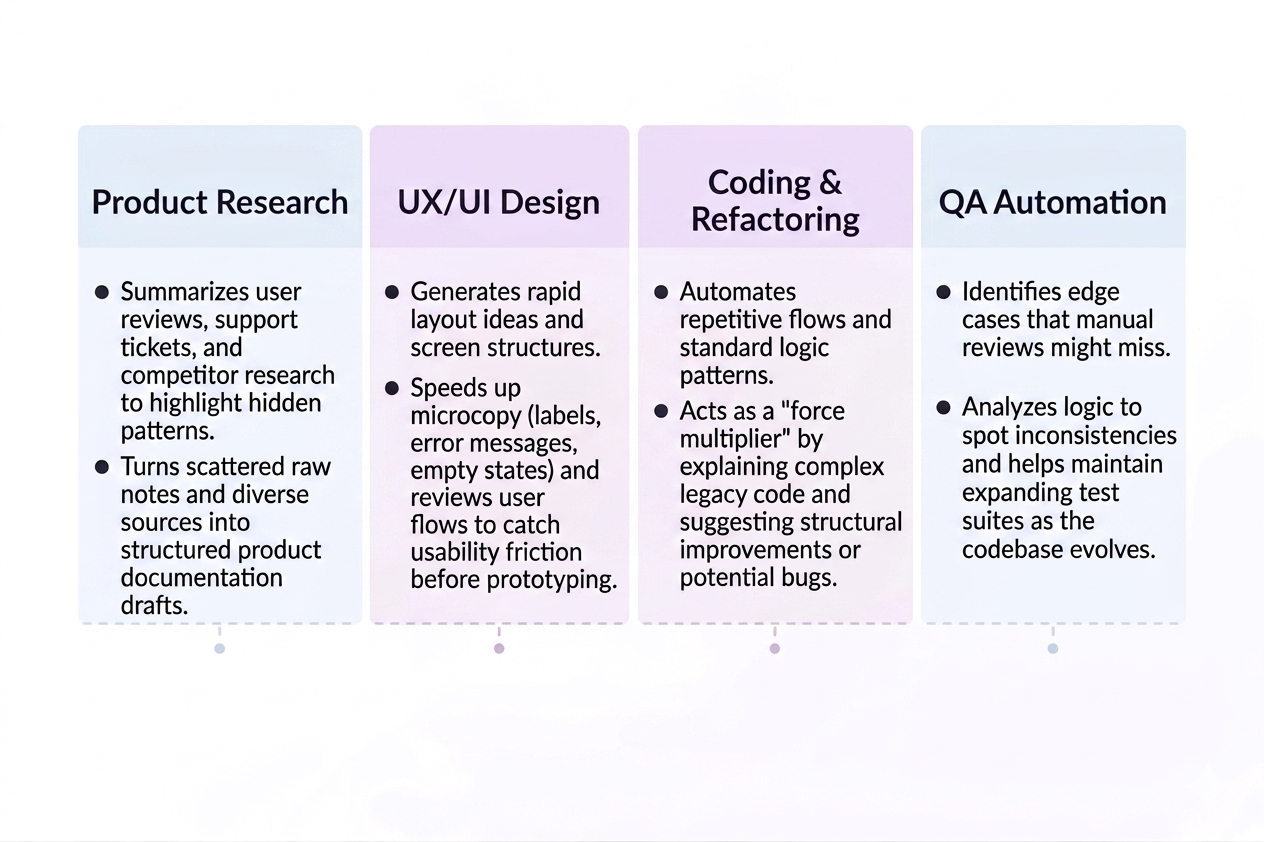
One of the most practical uses of AI in product research is quickly processing large amounts of data. Instead of manually going through reviews, support tickets, or competitor apps, AI helps summarize and highlight patterns.
AI is also helpful when shaping early product ideas. It can suggest possible features, variations, or even edge cases based on similar products and use cases. This doesn’t replace product thinking, but it gives a solid starting point and helps avoid missing obvious opportunities.
Another way we use it is to structure messy research into something usable. Raw notes, scattered insights, and different sources can be turned into clear summaries or drafts for product documentation. This makes it easier for the whole team to stay aligned from the beginning.
UX/UI design
In design, AI is especially useful at the exploration stage. It helps generate layout ideas, screen structures, or alternative approaches much faster than starting from a blank page. Designers still decide what works best, but they can explore more options in less time.
AI also helps with microcopy, which often takes more time than expected. Things like button labels, empty states, or error messages can be drafted quickly and then refined by the team. This keeps the tone consistent without slowing down the design process.
We also use AI to review user flows and spot potential usability issues early. It can highlight unclear steps or missing states that might not be obvious at first glance. Fixing these things early saves time later when development has already started.
Coding & refactoring
During development, AI is most helpful with repetitive and time-consuming tasks. Writing boilerplate code, setting up standard logic, or handling routine patterns can be done much faster. This allows developers to focus more on the core functionality of the product.
It’s also very useful when working with existing or unfamiliar code. AI can help explain parts of the codebase, suggest improvements, or point out potential issues. At Perpetio, this makes onboarding faster and reduces the time needed to work with legacy code.
Another practical use is refactoring. AI can suggest cleaner structures, better naming, or small performance improvements. Developers still review and decide what to keep, but the process becomes quicker and more efficient.
QA automation
In QA, AI helps generate test cases based on real user behavior. Instead of relying only on manually written scenarios, it can suggest additional cases, including edge situations that might otherwise be missed. This improves overall test coverage without increasing workload.
AI is also useful for identifying potential issues earlier in the process. By analyzing logic and expected behavior, it can highlight inconsistencies before they turn into actual bugs. This reduces the number of issues that reach later stages.
Finally, it supports ongoing testing by making it easier to maintain and expand test coverage. As the product grows, AI can suggest what should be tested next or updated, helping the QA process stay consistent without becoming too time-consuming.
Examples of AI Tools
There’s no single “AI tool” that does everything. In practice, teams combine different tools depending on the task. At Perpetio, we’ve tested quite a few setups, and some approaches clearly work better than others.
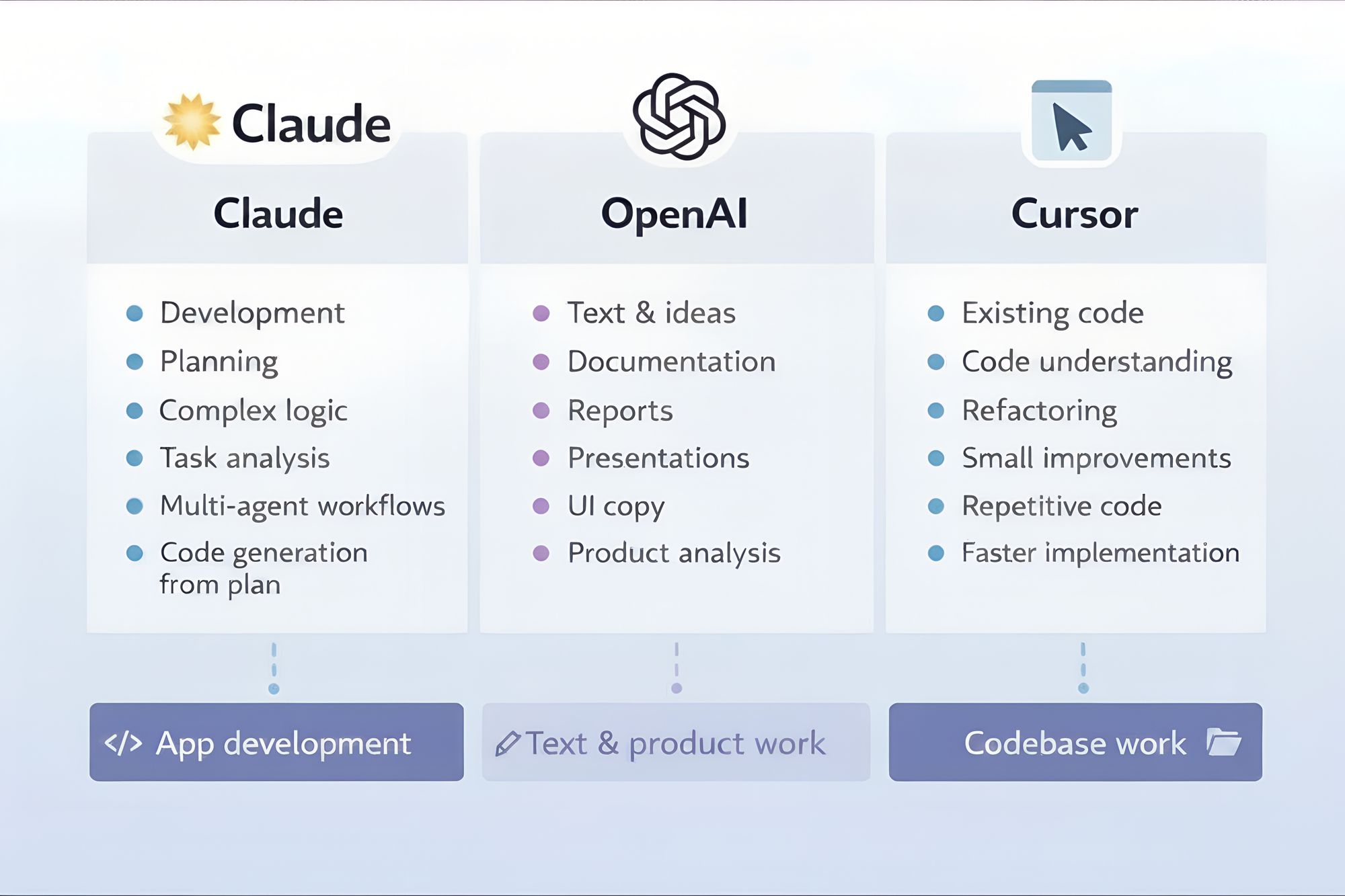
Claude
Claude AI is one of the tools we rely on the most, especially when it comes to development. It handles complex context really well, which makes it a strong choice for coding tasks, planning, and working with larger pieces of logic.
One setup we often use is splitting responsibilities between models. For example, one model focuses on analyzing the task and building a clear plan, while another one writes the code based on that plan. This helps keep things structured and also reduces token usage, since each model does a more focused job.
We also experiment with more advanced setups like sub-agents. These are separate AI roles, like an iOS engineer, Android engineer, or QA, that can work in parallel on different parts of the task. Instead of one general assistant, you get multiple specialized ones running in the background, which makes the process faster and more organized.
Another approach we find very effective is using Agent Skills. These are reusable instructions or workflows that help the AI perform specific tasks more efficiently. They significantly reduce token usage and make outputs more consistent, especially in repeated scenarios.
On top of that, there’s also Self-improving Skills. Instead of relying only on predefined instructions, these skills can evolve based on your codebase and workflows. Over time, this makes AI support more tailored and useful for the team.
OpenAI tools
OpenAI tools are useful when it comes to working with text, ideas, and anything that needs structuring or explaining. While they can support development, at Perpetio, we often use them on the product and communication side of things.
One of the most common uses is generating and refining content. This includes documentation, reports, presentations, and internal notes. Instead of starting from scratch, the team can quickly draft a solid structure and then adjust it to match the tone and specifics of the project.
They’re also very helpful for brainstorming. Whether it’s feature ideas, product improvements, or edge cases, AI can suggest different directions and help expand initial thoughts. It doesn’t replace product thinking, but it makes the process faster and less blocked.
Another practical use is working with user-facing text. From UI copy to onboarding messages and small interface details, AI helps generate options that can then be refined by designers and product teams. It keeps the process moving without getting stuck on wording.
Finally, OpenAI tools are useful for product analysis. They can help summarize research, compare features, or turn raw data into clear insights. This makes it easier to move from information to actual decisions without spending too much time organizing everything manually.
Cursor
Tools like Cursor are where AI becomes part of everyday development, not something separate. At Perpetio, this is one of the main ways developers actually interact with AI during coding.
A very common use for us is working with existing code. Instead of manually going through files, developers can quickly understand what a piece of code does, where changes need to be made, and how different parts are connected. This is especially helpful in larger projects or when joining a new codebase.
We also use it for refactoring and small improvements. Things like cleaning up functions, improving naming, or restructuring logic can be done much faster. Developers still review everything, but they don’t have to spend time on routine edits.
Another practical use is speeding up implementation. Writing repetitive code, setting up standard patterns, or handling simple logic becomes quicker with AI support right in the editor. It doesn’t replace development, but it removes a lot of friction and helps keep the pace consistent.
At Perpetio, we don’t see Cursor as something that replaces development. It’s more like a helper inside the coding flow that takes care of repetitive parts and saves time.
Real Impact on Projects
We’ve seen AI make a real difference not just in theory, but across actual projects at Perpetio, including our internal products like the Jrney travel app. The biggest change is not in “replacing work,” but in speeding up the parts that usually slow teams down.
20-40% faster cycles
On most projects, we’ve seen development cycles become roughly 20-40% faster. This doesn’t come from skipping steps, but from speeding up routine parts of the process like documentation, code generation, and initial planning.
When less time is spent on repetitive work, teams naturally move faster through each stage. Developers still stay fully in control, but the overall flow becomes smoother and more efficient.
Fewer bugs
AI also helps reduce the number of bugs that make it into later stages of development. By supporting earlier reviews, catching inconsistencies, and improving test coverage, many small issues are handled before they become real problems.
This doesn’t remove QA or developer responsibility. Instead, it adds an extra layer of support that helps spot things earlier in the process, which leads to cleaner releases and fewer last-minute fixes.
Better documentation
Documentation is one of those tasks that often slows teams down, but AI makes it much easier to keep up with. Instead of writing everything manually, teams can generate structured drafts and refine them as needed.
At Perpetio, we use this approach to keep documentation aligned with the actual product without spending too much extra time on it. It becomes a living part of the process instead of that extra task that gets postponed.
Faster MVP launch
For startup clients, this is where AI really shows its value. When the goal is to test an idea in real life as fast as possible, speed matters more than perfection.
AI helps reduce time spent on repetitive work like documentation, basic structure, or initial planning. This allows teams to focus on building a working MVP faster and getting real user feedback sooner.
In many cases, the approach is simple: better done than perfect. The faster a product reaches real users, the faster it can be improved based on actual feedback.
What AI Can’t Replace
It would be naive to think AI can do everything on its own without direction, guidance, and input from professionals. It’s a powerful tool that still needs someone who knows what to build with it. Without that, it doesn’t really create value on its own.
At Perpetio, we use AI as an extra layer of speed, not as a replacement for thinking. The real value still comes from people who understand products, users, and business goals.
Strategy
AI can suggest ideas, but it doesn’t understand the bigger business context behind a product. Choosing what to build, what to skip, and what actually matters still comes from experience and product thinking. This is where human judgment stays essential.
UX thinking
Good UX is not just about layouts or screens, it’s about understanding how real people behave. AI can help explore options, but it cannot truly feel friction points or user frustration. That comes from experience, testing, and empathy.
Architecture decisions
System design is another area where AI can assist but not decide. Choosing how things scale, how components interact, and what trade-offs to make requires deep technical understanding. These decisions directly impact long-term product stability.
Human leadership
AI doesn’t lead teams or take responsibility for outcomes. Projects still need someone to make decisions, align people, and keep everything moving in the same direction. Leadership is what turns output into a real product.
If you want to build an MVP and get it to market fast, we can help you turn your idea into a real product as a partner who also helps with product and technical decisions, not just someone who writes code.
The first consultation and quote on us. Just fill in the form, and we will get in touch.